KIDANVerse

Zurich

KIDANVerse

Lausanne

A refreshed experience is in progress. A few pages may be temporarily limited.

TOC

End-to-end security operations monitoring.

On-demand Consulting

Expert guidance for strategic technology decisions.

As a Service (Managed)

Enterprise services supporting critical IT infrastructure.

Implementation

Seamless enterprise technology solution deployment.

Training

Empower teams with expert-led technology programs.

Assessment and Audit

Gain complete visibility into your technology infrastructur

Solutions

Tailored IT solutions for operational excellence.

Procurement and Licensing

Expert on-demand consultation for technology procurement

Support

Dedicated IT support for seamless operations.

Most visited page

Expert guidance for strategic technology
decisions.

About Us

Learn more about KIDAN’s vision, values, and expertise.

Security Operations
Center (SOC)

Proactive security operations to
protect data asset

Infrastructure Operations Center (IOC)

Intelligent operations control for
agile IT systems

Network Operations
Center (NOC)

Ensuring smooth network operations
and uptime 24/7

About us

Expert guidance for strategic technology
decisions.

Contact Us

Learn more about KIDAN’s vision, values, and expertise.

Our Partners

Meet KIDAN’s partners working together to deliver technology solutions, support, and growth for businesses.
Strategic Vendor Partners
Collaborating with global leaders for advanced IT solutions
200 +
Technical Managed Solutions
Delivering specialized tools to address complex IT challenges
110 +
Enterprise clients across industry sectors
trust KIDAN’s strategic partnerships and solutions to drive technology success.
1250 +

ManageEngine

IAM

Access Manager Plus

ADManager Plus

ADSelfService Plus

Access Manager Plus

Key Manager Plus

Identity 360

PAM360

Password Manager Pro

Recovery Manager Plus

IAM

UEM

Security

Networks

Cloud

MSP

Help Desk

IT Analytics

ColorTokens

Cloudflare

SentinelOne

Microsoft

Horizon3

Zoho

Xink

Sangfor

390+

Strategic Vendor Partners

115+

Technical Managed Solutions

1'300+

Enterprise clients across industry sectors
Security Operations Center (SOC)

Infrastructure Operations Center (IOC)

Network Operations Center (NOC)

Help Desk and Service Desk

Make M365 Security

effortless

Finally.

CoreView ONE gives you unified visibility and control across your entire Microsoft 365 estate detecting misconfigurations, eliminating excessive privileges, and automating governance at scale.

Endorsed by Gartner

Chris Jackson, VP Analyst, Gartner: “In certain scenarios, organizations need to complement Microsoft’s native management tools with solutions that provide deeper governance capabilities

New · Agentic AI for M365 Administration

Meet Corey, the AI admin built to follow your rules.

Corey works alongside your admins to automate routine M365 tasks using natural language. Every action is scoped to least-privilege access and requires explicit approval before execution. Remediate misconfigurations, manage users, and respond to incidents in seconds, not hours.

20M

Licensed M365 users
managed by CoreView
CoreView platform data

4Bn

Weekly M365 events
analyzed by CoreView

CoreView platform data

$2.6M

Saved by one Fortune 500
on M365 license costs

CoreView customer case study

30K+

IT and security leaders
trust CoreView globally

CoreView.com

01 - The Challenge

01 -

The Challenge

Microsoft 365 is powerful. Managing it securely isn't easy.

Microsoft 365 is the world’s most comprehensive digital workspace, but with scale comes complexity that makes best-practice security and governance impractical.

Your organization faces 18+ admin interfaces, 80+ admin roles, and over 5,000 configuration types all evolving, all interconnected. Add hybrid environments, multi-tenant orgs, PowerShell sprawl, and third-party app permissions, and the exposure surface becomes unmanageable.

Without a unified platform, misconfigurations go undetected, licenses go wasted, and excessive privileges go unchecked  leaving your tenant exposed and your ROI unrealized.

18+

Admin Interfaces

40+

Workloads

80+

Admin Roles

5k+

Config Types

Security Risk

Misconfiguration Drift

Configurations drift silently from your security baseline. Without real-time detection, a single change can open your tenant to breach.

Visibility Gap

Excessive Privilege Exposure

Over-privileged accounts and third-party app permissions create invisible attack surfaces that standard M365 tools can’t identify.

Admin Overhead

Manual, Repetitive Administration

User onboarding, offboarding, and policy enforcement consume thousands of admin hours annually all ripe for automation.

ROI Loss

License Waste at Scale

Unused and underutilized licenses silently drain budget. Most organizations overspend by 15–30% on M365 licensing alone.

02 -

The solution

One Platform. Total Control
Across Your M365 Estate.

CoreView ONE connects bi-directionally to Microsoft 365 APIs, giving you unified visibility and control with security, governance, and productivity tools that make best practices effortless.

Detect Misconfigurations

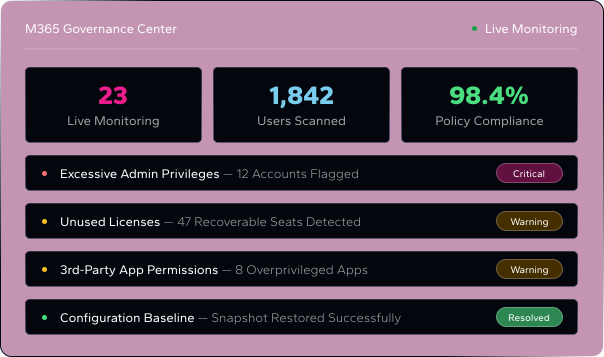
Establish a configuration baseline and instantly detect drift. Restore your tenant to a golden state in minutes after any incident.

Enforce Least Privilege

Get rapid visibility of excessive permissions across Entra ID and third-party apps. Create custom least-privilege roles with virtual tenant segmentation.

Automate Governance

Automate user lifecycle, policy enforcement, and license optimization with 150+ no-code actions, approval workflows, and ServiceNow integration.

Unified Reporting

130+ out-of-the-box reports and customizable admin dashboards give every stakeholder the visibility they need without raw PowerShell.

Multi-Tenant Management

Govern complex, hybrid, and multi-tenant environments from a single console. Ideal for MSPs, post-merger integrations, and global organizations.

License Optimization

Identify unused and underutilized licenses automatically. Policy-driven optimization delivers measurable ROI within the first year.

03 -

End-to-end coverage

Every Workload
Every Environment.

CoreView ONE provides comprehensive coverage across the full Microsoft 365 ecosystem from tenant-level configurations to on-premises environments and complex multi-tenant architectures.
Unlike point solutions that cover only one layer of your M365 stack, CoreView ONE pulls APIs across every workload giving you a single authoritative view of your entire environment.

Tenant Level Configurations

Entra ID

Intune

Defender

Purview

Microsoft 365 Workloads

Teams

SharePoint

Exchange

OneDrive

Copilot

Teams Phone

On-Premises Environments

Active Directory

Exchange On-Premises

Complex Environments

Multi-Tenant

Multi-Forest

PowerShell

3rd Party Apps

Objects Analyzed & Governed

Users

Groups

Licenses

Mailboxes

Calendars

Intune Devices

Mobile Devices

Entra Apps

SharePoint Sites

OneDrive

Teams Groups

Call Queues

04 -

Key capabilities

Governance tools built for

How Enterprises Control Actually Work

Configuration Backup & Restore

Snapshot your entire tenant configuration and restore it to a known-good state in minutes. The only M365 governance tool with true disaster recovery for configurations no equivalent exists in native Microsoft tooling.

Real-Time Drift Detection

Set your configuration baseline and receive instant alerts the moment any setting changes outside policy. Full forensic audit trail included for compliance obligations.

Virtual Tenant Segmentation

Create administrative boundaries inside your tenant by user, group, license pool, device, org unit, or Teams phone number. Least-privilege enforcement at a granular level with 400+ delegation properties.

No-Code Task Automation

Automate user onboarding, offboarding, and policy enforcement with 150+ out-of-the-box automations. Add approval workflows, branching logic, and ServiceNow integration without writing a line of code.

Policy Enforcement Engine

85+ out-of-the-box policies covering SharePoint, Teams, Exchange, Intune, license management, Entra apps, Copilot, and security & identity. Custom policies available on Professional and Enterprise tiers.

3rd-Party & Entra App Visibility

Get rapid visibility of every app permission in your tenant. Surface excessive OAuth grants, inactive apps, and risky consents then take action directly from the platform.

05 -

Packages

Three tiers. How One  platform.

Scale as you grow.

Every CoreView ONE package includes enterprise-grade platform security SSO, RBAC, SOC II & III, and ISO 27001 compliance across all tiers.

Tier 01

Essentials

Unified visibility, configuration management, and policy enforcement for organizations starting their M365 governance journey.
Access Reviews · Data · Audit Optional Add-Ons

Tier 02

Professional

Adds full automation and workflow capabilities. For organizations ready to eliminate manual admin work and enforce governance at scale.

Delegation & Hybrid Management Optional Add-Ons

Tier 03

Enterprise

Adds delegation, hybrid management, and advanced segmentation. For complex, regulated, or multi-tenant organizations.

Access Reviews · Full Audit (1yr) Optional Add-Ons

06 -

Customer results

Real outcomes.
Measurable  ROI

CoreView ONE customers consistently report significant improvements in security posture, admin efficiency, and license spend within the first year of deployment.

Oney Financial Services

4000+ Admin Hours
Saved Per Year

Segmented their tenant using CoreView Virtual Tenants, removed 75 excessively privileged accounts, and dramatically improved cyber resilience across their Microsoft 365 environment all without restructuring their team.

Fortune 500 Enterprise Customer

$2,600,000  saved on M365
licenses

Segmented their tenant using CoreView Virtual Tenants, removed 75 excessively privileged accounts, and dramatically improved cyber resilience across their Microsoft 365 environment all without restructuring their team.

07 -

Honest comparison

CoreView ONE vs.

Native Microsoft 365 Tools

Microsoft 365 includes powerful tools but they weren’t designed for enterprise governance at scale. Here’s where CoreView ONE closes the gaps that native tooling leaves open.

Capability

CoreView ONE

Native Microsoft 365

Configuration Backup & Restore

✓ Snapshot & restore in minutes

❌ Not Available

Real-Time Drift Detection

✓ Instant alerts with forensic trail

~ Limited via Compliance Center

Virtual Tenant Segmentation

✓400+ delegation properties

❌ Not Available

No-Code Automation & Workflows

✓ 150+ OOTB automations

~ Power Automate (requires development)

License Optimization Policies

✓ Automated detection & remediation

~ Manual review only

Multi-Tenant Unified Management

✓ Single console across all tenants

~ GDAP (limited, no unified reporting)

3rd-Party App Permission Governance

✓ Full visibility & remediation

~ Partial via Entra ID

Compliance: SOX, NIS2, DORA, FINMA

✓ Out-of-the-box CIS benchmarks

~ Requires manual mapping

Capability
CoreView
Native Microsoft

Configuration Backup & Restore

Real-Time Drift Detection

Virtual Tenant Segmentation

No-Code Automation & Workflows

License Optimization Policies

Multi-Tenant Unified Management

3rd-Party App Permission Governance

Compliance: SOX, NIS2, DORA, FINMA

✓ Snapshot & restore in minutes

✓ Instant alerts with forensic trail

✓400+ delegation properties

✓ 150+ OOTB automations

✓ Automated detection & remediation

✓ Single console across all tenants

✓ Full visibility & remediation

✓ Out-of-the-box CIS benchmarks

❌ Not Available

~ Limited via Compliance Center

❌ Not Available

~ Power Automate (requires development)

~ Manual review only

~ GDAP (limited, no unified reporting)

~ Partial via Entra ID

~ Requires manual mapping

How CoreView Compares

Not every tool does the same thing.


Choosing the right one matters.

CoreView is not the only tool for M365 management and we believe in honest positioning. CoreView ONE is purpose-built for enterprise governance, security resilience, and complex tenant management. Here is how it compares to Microsoft’s native tools and ManageEngine M365 Manager Plus and where each genuinely fits best.

Use Cases

Best for

Configuration backup & restore

Config drift detection & alerts

Virtual tenant segmentation

Multi-tenant management

Lifecycle automation

Reporting & visibility

On-premises hybrid (AD + Exchange)

CoreView ONE

Enterprise governance, security resilience, complex/multi-tenant environments

✓ Full tenant config backup, instant restore to golden image

✓ Real-time alerts on unauthorized configuration changes

✓ Granular delegation by user, group, license, device, org unit

✓ Unified console, cross-tenant policies and reporting

✓ 150+ OOTB automations, no-code builder, ServiceNow integration

✓ 130+ OOTB reports, actionable dashboards, all workloads

✓ Unified visibility across cloud and on-premises

Microsoft Native Tools

Organizations fully within Microsoft ecosystem, basic admin tasks

✗ Not available natively data only, not configuration

⚡ Partial audit log only, no real-time alerting

⚡ Limited admin roles are tenant-wide by default

✗ Separate login per tenant, no unified view

⚡ Power Automate requires development skills and separate licensing

⚡ Fragmented across admin centers no unified reporting

⚡ Partial separate tools required for on-premises

ManageEngine M365 Manager Plus

SMB / ManageEngine ecosystem customers needing M365 reporting & basic admin

✗ Not available

✗ Not available

✗ Not available

⚡ Basic multi-tenant reporting, limited policy management

⚡ Basic automation, limited workflow complexity

✓ Strong M365 reporting a genuine strength for SMB teams

⚡ Available but limited depth vs CoreView

Use Cases

CoreView ONE

Microsoft Native Tools

ManageEngine M365 Manager Plus

Best for

Enterprise governance, security resilience, complex/multi-tenant environments

Organizations fully within Microsoft ecosystem, basic admin tasks

SMB / ManageEngine ecosystem customers needing M365 reporting & basic admin

Configuration backup & restore

✓ Full tenant config backup, instant restore to golden image

✗ Not available natively data only, not configuration

✗ Not available

Config drift detection & alerts

✓ Real-time alerts on unauthorized configuration changes

⚡ Partial audit log only, no real-time alerting

✗ Not available

Virtual tenant segmentation

✓ Granular delegation by user, group, license, device, org unit

⚡ Limited admin roles are tenant-wide by default

✗ Not available

Multi-tenant management

✓ Unified console, cross-tenant policies and reporting

✗ Separate login per tenant, no unified view

⚡ Basic multi-tenant reporting, limited policy management

Lifecycle automation

✓ 150+ OOTB automations, no-code builder, ServiceNow integration

⚡ Power Automate requires development skills and separate licensing

⚡ Basic automation, limited workflow complexity

Reporting & visibility

✓ 130+ OOTB reports, actionable dashboards, all workloads

⚡ Fragmented across admin centers no unified reporting

✓ Strong M365 reporting a genuine strength for SMB teams

On-premises hybrid (AD + Exchange)

✓ Unified visibility across cloud and on-premises

⚡ Partial separate tools required for on-premises

⚡ Available but limited depth vs CoreView

Both tools

When both are relevant — and can coexist

CoreView ONE

Choose CoreView when you need

Both tools

When both are relevant and can coexist

KIDAN × CoreView — Authorized Partner in Switzerland

See what CoreView would find in your tenant.

KIDAN is CoreView’s authorized partner in Switzerland. We run a no-commitment assessment of your M365 tenant exposing configuration risks, privilege exposure, and license waste in days, not weeks.

Quick details before your demo

Almost there – a few quick details first.

Thank you for applying to the KAI Builder Program by KIDAN.

Your application is now under review. Our team will carefully evaluate your use case, commitment level, and strategic fit. If shortlisted, you will hear from us within 5 business days to schedule your Discovery Call.

We look forward to potentially building the future of AI together.

Quick details before your demo

Almost there – a few quick details first.

Quick details before your demo

Almost there – a few quick details first.

Quick details before your demo

Almost there – a few quick details first.

Quick details before your demo

Almost there – a few quick details first.

Quick details before your demo

Almost there – a few quick details first.

Quick details before your demo

Almost there – a few quick details first.

Quick details before your demo

Almost there – a few quick details first.

Quick details before your demo

Almost there – a few quick details first.

Quick details before your demo

Almost there – a few quick details first.

Quick details before your demo

Almost there – a few quick details first.

Quick details before your demo

Almost there – a few quick details first.

Quick details before your demo

Almost there – a few quick details first.

Quick details before your demo

Almost there – a few quick details first.

Quick details before your demo

Almost there – a few quick details first.

Quick details before your demo

Almost there – a few quick details first.

Quick details before your demo

Almost there – a few quick details first.

Quick details before your demo

Almost there – a few quick details first.

Quick details before your demo

Almost there – a few quick details first.

Quick details before your demo

Almost there – a few quick details first.

Quick details before your demo

Almost there – a few quick details first.

Quick details before your demo

Almost there – a few quick details first.

Quick details before your demo

Almost there – a few quick details first.

Quick details before your demo

Almost there – a few quick details first.

Quick details before your demo

Almost there – a few quick details first.

Quick details before your demo

Almost there – a few quick details first.

Quick details before your demo

Almost there – a few quick details first.

Quick details before your demo

Almost there – a few quick details first.

Quick details before your demo

Almost there – a few quick details first.

Quick details before your demo

Almost there – a few quick details first.

Quick details before your demo

Almost there – a few quick details first.

Quick details before your demo

Almost there – a few quick details first.

Quick details before your demo

Almost there – a few quick details first.

Quick details before your demo

Almost there – a few quick details first.

Quick details For Pricing

Almost there – a few quick details first.

Quick details before your demo

Almost there – a few quick details first.

Quick details before your demo

Almost there – a few quick details first.

Quick details before your demo

Almost there – a few quick details first.

Quick details before your demo

Almost there – a few quick details first.

Quick details before your demo

Almost there – a few quick details first.

Quick details before your demo

Almost there – a few quick details first.

Quick details before your demo

Almost there – a few quick details first.

Quick details before your demo

Almost there – a few quick details first.

Quick details before your demo

Almost there – a few quick details first.

Quick details before your demo

Almost there – a few quick details first.

Quick details before your demo

Almost there – a few quick details first.

Quick details before your demo

Almost there – a few quick details first.

Quick details before your demo

Almost there – a few quick details first.

Quick details before your demo

Almost there – a few quick details first.

Quick details before your demo

Almost there – a few quick details first.