A refreshed experience is in progress. A few pages may be temporarily limited.

As a Service

Reach out to KIDAN for inquiries and support.

On-demand Consulting

Expert guidance for strategic technology decisions.

Toc

24/7 global technology operations center.

Implementation

Seamless enterprise technology solution deployment.

Training

Empower teams with expert-led technology programs.

Services

Enterprise services supporting critical IT infrastructure.

Solutions

Tailored IT solutions for operational excellence.

SOC

End-to-end security operations monitoring.

Support

Dedicated IT support for seamless operations.

Most visited page

Expert guidance for strategic technology decisions.

About Us

Learn more about KIDAN’s vision, values, and expertise.

Our Partners

Meet KIDAN’s partners working together to deliver technology solutions, support, and growth for businesses.
Leading enterprise IT management solutions
offered via KIDAN’s trusted partner ecosystem for scalable, secure operations.
10 +
Leading enterprise IT management solutions
offered via KIDAN’s trusted partner ecosystem for scalable, secure operations.
110 +
Enterprise clients across industry sectors

trust KIDAN’s strategic partnerships and solutions to drive technology success.
950 +

ADAudit Plus For On-site & Cloud IT Auditing & Compliance

Proactively secure your on-premises and multi-cloud infrastructure with a unified platform that delivers real-time monitoring, UBA-driven insights, and compliance auditing, all in one place.

Are You Auditing Your AD, Or Hoping It’s Secure?

THE BLIND SPOT: A Reactive Approach

Without centralized Active Directory auditing, critical changes go unnoticed, investigations delayed often.

Security Gaps

Unauthorized changes and privilege escalations often go unnoticed.

Compliance Pressure

No centralized audit trails to meet Swiss EU compliance laws

Manual Effort

IT teams waste hours combing native logs visibility

Insider Risk

Suspicious behavior is missed until damage is done.

Limited Audit Visibility

Native AD logs lack detail, retention, and visibility

Compliance Risk Exposure

Manual log collection delays detection increases compliance risk

THE CLARITY: A Unified Audit Platform

A centralized Active Directory auditing platform delivering real-time monitoring alerts for compliance.

Real-Time Auditing

Monitor every AD change users, groups, GPOs, and more.

Audit-Ready Reports

Generate FADP/GDPR-compliant reports with one click.

Smart Alerts

Get notified instantly when something unusual happens.

Behavior Insights

Detect risky patterns before they become threats.

Complete Change Accountability

Who what when where auditing across users groups

Swiss Compliance Readiness

Prebuilt FADP GDPR reports provide instant audit readiness

All-In-One AD Auditing Platform 

Everything in IT starts with identity and identity lives in Active Directory. AD Audit Plus brings visibility, control, and accountability to your AD environment, helping you secure your digital infrastructure and meet compliance with confidence.

Audit

Everything

User Logons 

Group Changes 

GPO Modifications 

File Access 

Empower

Everyone

IT Admins 

Security Teams 

Compliance Officers 

Leadership 

Secure

Every Action

On-Prem AD 

Azure AD 

File Servers 

Domain Controllers 

Track What Matters 

No more blind spots. Know exactly who did what, when, and where.

Detect Insider Threats 

Act before threats escalate, protect your data and reputation.

Simplify Compliance 

Stay audit-ready without the stress or manual effort.

Save Time, Gain Control 

Free up your IT team to focus on what matters most.

All Identities Secured With Powerful Features

Verify identities vigilantly with adaptive authentication, and fortify your networks with customizable, role-based, and restrictive access.

Real-Time AD Change Auditing

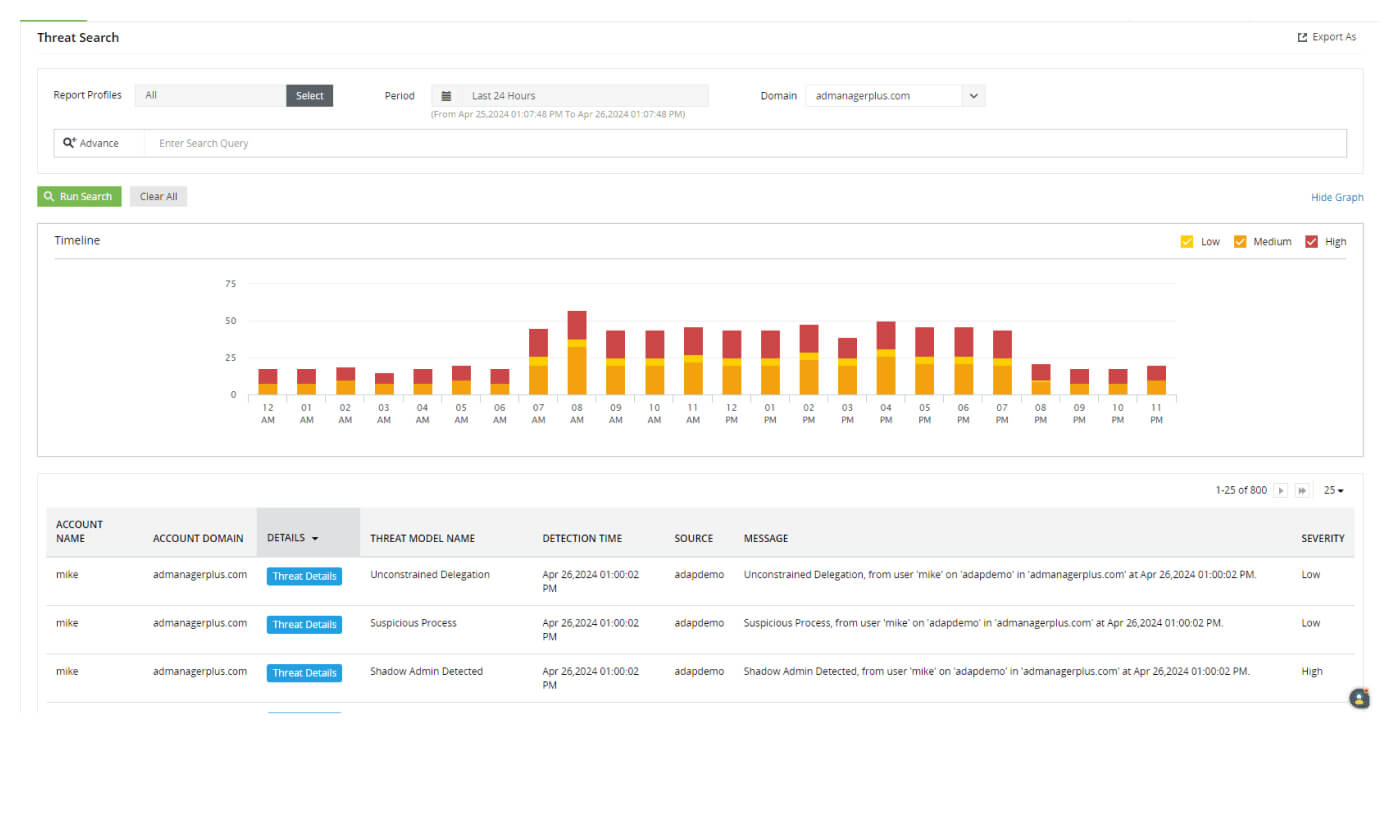
Track every change in Active Directory, users, groups, GPOs, OUs, permissions, and more.Full visibility into “Who did what, when, and from where.” 

File Server Auditing

Monitor file access, modifications, deletions, and permission changes across Windows, NetApp, EMC, Synology, QNAP, and Azure file servers. 

Account Lockout Analysis

Identify the root cause of account lockouts across Windows components. Reduce downtime and improve user experience. 

User Behavior Analytics (UBA)

Detect anomalies in user activity using behavior baselines. Spot insider threats before they escalate. 

Ransomware Detection

Get alerts on sudden spikes in file access and auto-isolate infected devices. Minimize damage and respond instantly. 

Compliance Reporting

Access 250+ prebuilt reports for GDPR, FADP, HIPAA, SOX, PCI DSS, and more. Stay audit-ready with minimal manual eff

Remote Logon & RDP Monitoring

Track remote desktop connections and logons via RDG and RADIUS servers. Benefit: Secure remote access and monitor usage. 

PowerShell Auditing

Monitor PowerShell activity and commands executed.Prevent misuse of scripting tools by attackers or insiders. 

Scheduled Task & Process Auditing

Audit creation, deletion, and modification of scheduled tasks and running processes. Detect unauthorized automation or malicious scripts. 

SIEM Integration

Forward logs to Splunk, ArcSight, and Syslog servers. Enhance centralized threat detection and response. 

Features | ManageEngine ADAudit Plus 


Windows logon
auditing

Windows logon auditing

Continuously audit logon activity. Track everything from logon failures to logon
history.

Account lockout analysis

Account lockout analysis

Receive alerts about lockouts, and find the root cause of lockouts from an extensive list of Windows components.

Staff Hours Tracking

Staff Hours Tracking

Continuously monitor active and idle time spent by employees at their
workstations.

Windows server change
notifier

Windows server change notifier

Get information on who did what change, when, and from where in your Windows Server environment.

Privileged user
monitoring

Privileged user monitoring

Audit use of privileges to hold admins and other privileged users accountable for their actions.

File change monitoring

File change monitoring

Track file changes across Windows, NetApp, EMC, Synology, Hitachi, Huawei, Amazon FSx, QNAP, Azure.

Active Directory (AD)

Active Directory (AD)

Get full visibility into logon activity, AD and GPO changes, privileged user actions, and more.

Azure AD

Azure AD

Audit sign-ins and changes in Azure AD, and gain a correlated view of activity across hybrid environments.

Windows Server

Windows Server

Audit Windows Server logons, account changes, security settings, files, AD FS, printers.

Windows Workstation

Windows Workstation

Monitor logons and changes to local accounts, security settings, and files in Windows workstations.

Mac Workstation

Mac Workstation

Monitor user logon and logoff activities happening across Apple Mac computers in your network.

Windows file server

Windows file server

Track successful and failed file accesses, ownership changes, permission changes, and more in Windows file servers and failover clusters.

SOX

SOX

Closely monitor logon activity, AD changes, administrative user actions, and file changes to meet SOX requirements.

HIPAA

HIPAA

Track access to files containing protected health information, logon activity, and AD changes to meet HIPAA requirements.

GDPR

GDPR

Keep tabs on logon activity and file changes to meet the GDPR requirements.

PCI DSS

PCI DSS

Track access to files containing card holder data, logon activity, and AD changes to meet PCI DSS requirements.

GLBA

GLBA

Audit logon activity, AD changes, and file changes to meet GLBA requirements.

FISMA

FISMA

Closely monitor logon activity, AD changes, administrative user actions, and file changes to meet FISMA requirements.

Healthcare

Healthcare

Track user logons, AD changes, and sensitive file access to ensure HIPAA compliance.

Finance

Finance

Audit file access, alert on suspicious logons and AD changes, ensuring PCI DSS compliance.

Education

Education

Track user logons, AD changes, and student data access to maintain FERPA
compliance.

Deployment Options

On-Premises Deployment

Install and run AD Audit Plus within your local infrastructure.
Install and run AD Audit Plus within your local infrastructure.Ideal for: Organizations with strict data residency or internal control requirements.Download On-Prem Installer

Cloud & Hybrid Support

Seamlessly audit both on-premises Active Directory and cloud environments
AD Audit Plus can audit both on-premises Active Directory and cloud environments like Azure AD (Entra ID).Ideal for: Businesses operating in hybrid or cloud-first setups.

Explore Hybrid Capabilities

AD Audit Plus can audit both on-premises Active Directory and cloud environments like Azure AD

Monitor and audit changes across Windows Servers, Azure AD, file servers, and domain controllers, all from a single dashboard.Benefit: Centralized visibility and control across your entire identity infrastructure.

Streamline auditing, demonstrate
compliance, and detect threats with
just a few clicks

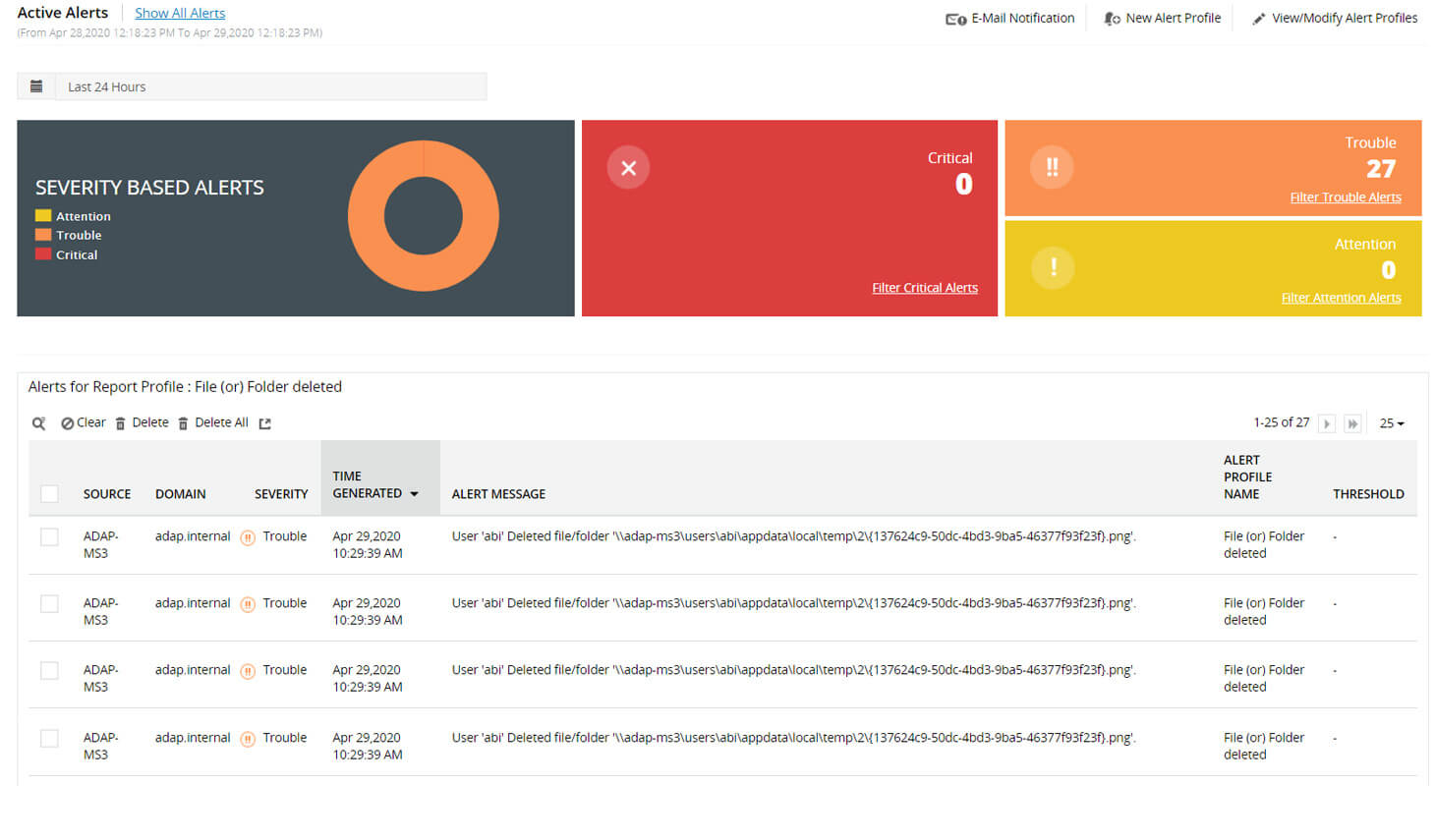
icon Detect critical activities with instant alerts
Learn More
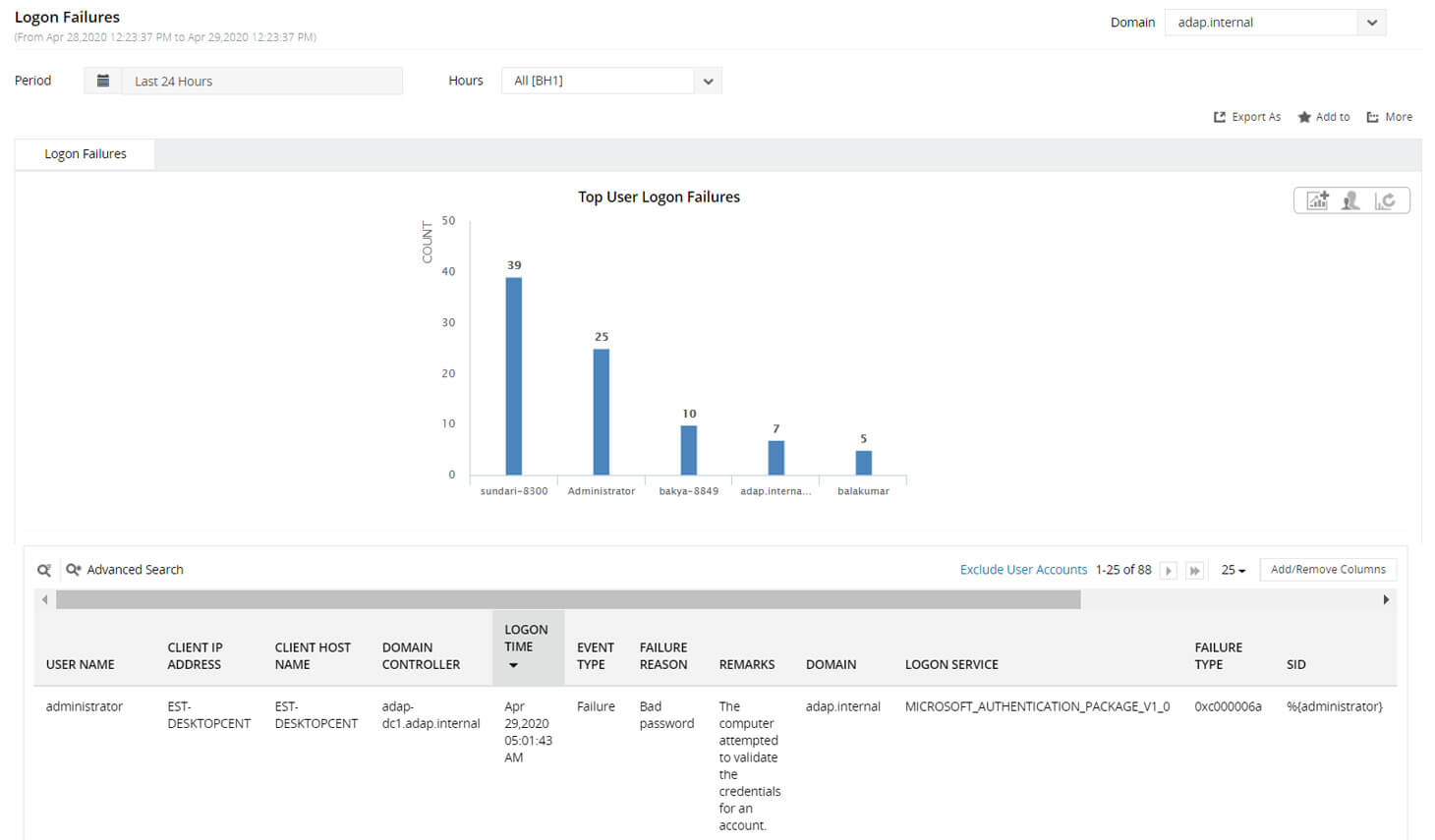
icon Pass compliance audits with over 250 built-in reports
Learn More
icon Streamline threat detection with attack surface analyzer
Learn More

For better implementation experience, and tailored solutions that's unique to your business.

How KIDAN Works with You

Choose the Model That Fits You Best 

We don’t just provide software we partner with you to ensure it delivers real, lasting value. Whether you’re looking for light-touch guidance or full-scale operational support, we offer flexible service models tailored to your needs. 

License + Expert Guidance

Start with the right license and unlock full value.
Already have the tool or just getting started? We’ll help you provision the right licenses and guide you to unlock the full potential of your investment. Think of us as your strategic advisor always available, never intrusive.

Implementation & Onboarding

We’ll help you set up, onboard, and train your team.

We’ll help you set up, onboard, and train your team.Need help getting up and running? We’re with you every step of the way from setup and configuration to onboarding and training. Our experts ensure your team is confident, capable, and ready to go.

Fully Managed Service

We manage everything so you don’t have to. 

Prefer to stay hands-off? Let us run the tool for you. We’ll handle everything monitoring, maintenance, updates, and optimization so you can focus on what matters most: your
business.

As your technology partner, we are committed to growing with you and tailoring the best model for your needs.

Upgrade to a Fully Managed Security Posture

Introducing KIDAN’s Endpoint Management and Security as a Service powered by our 24/7 Swiss-led Technology Operations Center (TOC)

24/7 Proactive Security & Threat Mitigation

Our TOC operates around the clock to monitor your endpoints. We don’t just send you alerts; we actively investigate, validate, and remediate threats before they can impact your operations. This includes vulnerability management, patch deployment, and enforcing security configurations across your entire fleet of devices.

Expert Management & Optimization

Your Endpoint Central platform will be managed and optimized by certified engineers who live and breathe this technology. We handle all software deployments, policy configurations, and routine maintenance, ensuring the tool is always performing at its peak and aligned with the latest security best practices.

Strategic Reporting & Visibility

Move beyond raw data. We provide you with clear, executive-level monthly reports that translate technical activity into business-relevant insights. Understand your security posture, see the threats we’ve neutralized, and demonstrate compliance with ease.


We’ve been redefining IT for enterprises, excellence in every solution.

From a security, ISO 27001, and GDPR perspective, we use ADAudit Plus to help us keep an eye on the number of intruder lockouts and other various metrics in terms of breach detection.

James McMillan

Chief Technology Officer

adauditplsus-livedemo

MM slash DD slash YYYY

Your Questions, Answered with Clarity.

Direct answers to the most common strategic, technical, and commercial questions
about Endpoint Central.

ADAudit Plus by ManageEngine is an on-premise auditing solution. Key features include tools that allow users to audit active directories, login and logoff records, file servers, and Windows server data. It provides information about active directory objects including users, groups, computers, and configuration changes.

ADAudit Plus provides a clear picture of all changes made to your AD resources including AD objects and their attributes, group policy, and more. AD auditing helps detect and respond to insider threat, privilege misuse, and other indicators of compromise, and in short, strengthens your organization’s security posture.

Securely track the File Servers for access, changes to the documents in their files and folder structure, shares and permissions. View from the exclusive file audit reports with 50+ search attributes and filter based on user / file server / custom / share based reporting for crisp detailed information. Also, get instant email alerts on File Servers activities upon unauthorized actions / access to critical files & folders. Find answers to the vital 4W’s – ‘Who effected what change in File Server, when and from where’.

Windows File Server auditing | Access permissions audit | Compliance audit reports

  • Detailed forensics of all changes / failed attempts to file create, delete, modification and folder structure

  • Track file and folder access permissions & owners

  • Audit Windows Failover Clusters for a secure, downtime-free and a compliant network environment

  • Monitor EMC Servers, NetApp Filers CIFS files / folders create, modify and delete, change permissions etc.,

Gain visibility into your NetApp storage devices with ManageEngine ADAudit Plus, a NetApp file auditing and reporting tool. Receive detailed reports on user activity in NetApp files and CIFS shares, analyze permission changes, and automate responses to security incidents.

Being the Swiss Partner of ManageEngine, Kidan is responsible for aiding with professional services, such as installing, implementing, configuring, training, and supporting the company to ensure an effective on-boarding of ADAudit Plus.

To make it even better, Kidan even provides advice on top of it all!

Get in touch with us to know more.

1 Minute Guided Tour about the AD
Audit Plus features and experience
of the users 

Deployment Options

On-Premises Deployment

Install and run AD Audit Plus within your local infrastructure.
Install and run AD Audit Plus within your local infrastructure.Ideal for: Organizations with strict data residency or internal control requirements.Download On-Prem Installer

Cloud & Hybrid Support

Seamlessly audit both on-premises Active Directory and cloud environments
AD Audit Plus can audit both on-premises Active Directory and cloud environments like Azure AD (Entra ID).Ideal for: Businesses operating in hybrid or cloud-first setups.

Explore Hybrid Capabilities

AD Audit Plus can audit both on-premises Active Directory and cloud environments like Azure AD

Monitor and audit changes across Windows Servers, Azure AD, file servers, and domain controllers, all from a single dashboard.Benefit: Centralized visibility and control across your entire identity infrastructure.

For better implementation experience, and tailored solutions that's unique to your business.

How KIDAN Works with You

Choose the Model That Fits You Best 

We don’t just provide software we partner with you to ensure it delivers real, lasting value. Whether you’re looking for light-touch guidance or full-scale operational support, we offer flexible service models tailored to your needs. 

License + Expert Guidance

Start with the right license and unlock full value.
Already have the tool or just getting started? We’ll help you provision the right licenses and guide you to unlock the full potential of your investment. Think of us as your strategic advisor always available, never intrusive.

Implementation & Onboarding

We’ll help you set up, onboard, and train your team.

We’ll help you set up, onboard, and train your team.Need help getting up and running? We’re with you every step of the way from setup and configuration to onboarding and training. Our experts ensure your team is confident, capable, and ready to go.

Fully Managed Service

We manage everything so you don’t have to. 

Prefer to stay hands-off? Let us run the tool for you. We’ll handle everything monitoring, maintenance, updates, and optimization so you can focus on what matters most: your
business.

As your technology partner, we are committed to growing with you and tailoring the best model for your needs.

ROI calculator

This return on investment (ROI) calculator will help organizations estimate their potential yearly cost savings in USD and yearly ROI after automating the change audit report generation process using ADAudit Plus.
Number Of Domain Controllers:
Hourly Pay Given To An IT Admin In USD:
Average Number Of Working Days Per Year:
Average Time Taken To Generate A Change Audit Report Using Native Tools In Minutes:
Average Number Of Change Audit Reports Generated Per Work Day:

Lock In This Estimate And Get A Full Solution Proposal.

We’ve been redefining IT for enterprises, excellence in every solution.

From a security, ISO 27001, and GDPR perspective, we use ADAudit Plus to help us keep an eye on the number of intruder lockouts and other various metrics in terms of breach detection.

James McMillan

Chief Technology Officer

adauditplsus-livedemo

MM slash DD slash YYYY

Your Questions, Answered with Clarity.

Direct answers to the most common strategic, technical, and commercial questions
about Endpoint Central.

ADAudit Plus by ManageEngine is an on-premise auditing solution. Key features include tools that allow users to audit active directories, login and logoff records, file servers, and Windows server data. It provides information about active directory objects including users, groups, computers, and configuration changes.

ADAudit Plus provides a clear picture of all changes made to your AD resources including AD objects and their attributes, group policy, and more. AD auditing helps detect and respond to insider threat, privilege misuse, and other indicators of compromise, and in short, strengthens your organization’s security posture.

Securely track the File Servers for access, changes to the documents in their files and folder structure, shares and permissions. View from the exclusive file audit reports with 50+ search attributes and filter based on user / file server / custom / share based reporting for crisp detailed information. Also, get instant email alerts on File Servers activities upon unauthorized actions / access to critical files & folders. Find answers to the vital 4W’s – ‘Who effected what change in File Server, when and from where’.

Windows File Server auditing | Access permissions audit | Compliance audit reports

  • Detailed forensics of all changes / failed attempts to file create, delete, modification and folder structure

  • Track file and folder access permissions & owners

  • Audit Windows Failover Clusters for a secure, downtime-free and a compliant network environment

  • Monitor EMC Servers, NetApp Filers CIFS files / folders create, modify and delete, change permissions etc.,

Gain visibility into your NetApp storage devices with ManageEngine ADAudit Plus, a NetApp file auditing and reporting tool. Receive detailed reports on user activity in NetApp files and CIFS shares, analyze permission changes, and automate responses to security incidents.

Being the Swiss Partner of ManageEngine, Kidan is responsible for aiding with professional services, such as installing, implementing, configuring, training, and supporting the company to ensure an effective on-boarding of ADAudit Plus.

To make it even better, Kidan even provides advice on top of it all!

Get in touch with us to know more.

All Identities Secured With Powerful Features

Verify identities vigilantly with adaptive authentication, and fortify your networks with customizable, role-based, and restrictive access.

Real-Time AD Change Auditing

Track every change in Active Directory, users, groups, GPOs, OUs, permissions, and more.Full visibility into “Who did what, when, and from where.” 

File Server Auditing

Monitor file access, modifications, deletions, and permission changes across Windows, NetApp, EMC, Synology, QNAP, and Azure file servers. 

Account Lockout Analysis

Identify the root cause of account lockouts across Windows components. Reduce downtime and improve user experience. 

User Behavior Analytics (UBA)

Detect anomalies in user activity using behavior baselines. Spot insider threats before they escalate. 

Ransomware Detection

Get alerts on sudden spikes in file access and auto-isolate infected devices. Minimize damage and respond instantly. 

Compliance Reporting

Access 250+ prebuilt reports for GDPR, FADP, HIPAA, SOX, PCI DSS, and more. Stay audit-ready with minimal manual eff

Remote Logon & RDP Monitoring

Track remote desktop connections and logons via RDG and RADIUS servers. Benefit: Secure remote access and monitor usage. 

PowerShell Auditing

Monitor PowerShell activity and commands executed.Prevent misuse of scripting tools by attackers or insiders. 

Scheduled Task & Process Auditing

Audit creation, deletion, and modification of scheduled tasks and running processes. Detect unauthorized automation or malicious scripts. 

SIEM Integration

Forward logs to Splunk, ArcSight, and Syslog servers. Enhance centralized threat detection and response. 

Features | ManageEngine ADAudit Plus 


Windows logon
auditing

Windows logon auditing

Continuously audit logon activity. Track everything from logon failures to logon
history.

Account lockout analysis

Account lockout analysis

Receive alerts about lockouts, and find the root cause of lockouts from an extensive list of Windows components.

Staff Hours Tracking

Staff Hours Tracking

Continuously monitor active and idle time spent by employees at their
workstations.

Windows server change
notifier

Windows server change notifier

Get information on who did what change, when, and from where in your Windows Server environment.

Privileged user
monitoring

Privileged user monitoring

Audit use of privileges to hold admins and other privileged users accountable for their actions.

File change monitoring

File change monitoring

Track file changes across Windows, NetApp, EMC, Synology, Hitachi, Huawei, Amazon FSx, QNAP, Azure.

Active Directory (AD)

Active Directory (AD)

Get full visibility into logon activity, AD and GPO changes, privileged user actions, and more.

Azure AD

Azure AD

Audit sign-ins and changes in Azure AD, and gain a correlated view of activity across hybrid environments.

Windows Server

Windows Server

Audit Windows Server logons, account changes, security settings, files, AD FS, printers.

Windows Workstation

Windows Workstation

Monitor logons and changes to local accounts, security settings, and files in Windows workstations.

Mac Workstation

Mac Workstation

Monitor user logon and logoff activities happening across Apple Mac computers in your network.

Windows file server

Windows file server

Track successful and failed file accesses, ownership changes, permission changes, and more in Windows file servers and failover clusters.

SOX

SOX

Closely monitor logon activity, AD changes, administrative user actions, and file changes to meet SOX requirements.

HIPAA

HIPAA

Track access to files containing protected health information, logon activity, and AD changes to meet HIPAA requirements.

GDPR

GDPR

Keep tabs on logon activity and file changes to meet the GDPR requirements.

PCI DSS

PCI DSS

Track access to files containing card holder data, logon activity, and AD changes to meet PCI DSS requirements.

GLBA

GLBA

Audit logon activity, AD changes, and file changes to meet GLBA requirements.

FISMA

FISMA

Closely monitor logon activity, AD changes, administrative user actions, and file changes to meet FISMA requirements.

Healthcare

Healthcare

Track user logons, AD changes, and sensitive file access to ensure HIPAA compliance.

Finance

Finance

Audit file access, alert on suspicious logons and AD changes, ensuring PCI DSS compliance.

Education

Education

Track user logons, AD changes, and student data access to maintain FERPA
compliance.

Deployment Options

On-Premises Deployment

Install and run AD Audit Plus within your local infrastructure.
Install and run AD Audit Plus within your local infrastructure.Ideal for: Organizations with strict data residency or internal control requirements.Download On-Prem Installer

Cloud & Hybrid Support

Seamlessly audit both on-premises Active Directory and cloud environments
AD Audit Plus can audit both on-premises Active Directory and cloud environments like Azure AD (Entra ID).Ideal for: Businesses operating in hybrid or cloud-first setups.

Explore Hybrid Capabilities

AD Audit Plus can audit both on-premises Active Directory and cloud environments like Azure AD

Monitor and audit changes across Windows Servers, Azure AD, file servers, and domain controllers, all from a single dashboard.Benefit: Centralized visibility and control across your entire identity infrastructure.

For better implementation experience, and tailored solutions that's unique to your business.

How KIDAN Works with You

Choose the Model That Fits You Best 

We don’t just provide software we partner with you to ensure it delivers real, lasting value. Whether you’re looking for light-touch guidance or full-scale operational support, we offer flexible service models tailored to your needs. 

License + Expert Guidance

Start with the right license and unlock full value.
Already have the tool or just getting started? We’ll help you provision the right licenses and guide you to unlock the full potential of your investment. Think of us as your strategic advisor always available, never intrusive.

Implementation & Onboarding

We’ll help you set up, onboard, and train your team.

We’ll help you set up, onboard, and train your team.Need help getting up and running? We’re with you every step of the way from setup and configuration to onboarding and training. Our experts ensure your team is confident, capable, and ready to go.

Fully Managed Service

We manage everything so you don’t have to. 

Prefer to stay hands-off? Let us run the tool for you. We’ll handle everything monitoring, maintenance, updates, and optimization so you can focus on what matters most: your
business.

As your technology partner, we are committed to growing with you and tailoring the best model for your needs.

We’ve been redefining IT for enterprises, excellence in every solution.

From a security, ISO 27001, and GDPR perspective, we use ADAudit Plus to help us keep an eye on the number of intruder lockouts and other various metrics in terms of breach detection.

James McMillan

Chief Technology Officer

adauditplsus-livedemo

MM slash DD slash YYYY

Your Questions, Answered with Clarity.

Direct answers to the most common strategic, technical, and commercial questions
about Endpoint Central.

ADAudit Plus by ManageEngine is an on-premise auditing solution. Key features include tools that allow users to audit active directories, login and logoff records, file servers, and Windows server data. It provides information about active directory objects including users, groups, computers, and configuration changes.

ADAudit Plus provides a clear picture of all changes made to your AD resources including AD objects and their attributes, group policy, and more. AD auditing helps detect and respond to insider threat, privilege misuse, and other indicators of compromise, and in short, strengthens your organization’s security posture.

Securely track the File Servers for access, changes to the documents in their files and folder structure, shares and permissions. View from the exclusive file audit reports with 50+ search attributes and filter based on user / file server / custom / share based reporting for crisp detailed information. Also, get instant email alerts on File Servers activities upon unauthorized actions / access to critical files & folders. Find answers to the vital 4W’s – ‘Who effected what change in File Server, when and from where’.

Windows File Server auditing | Access permissions audit | Compliance audit reports

  • Detailed forensics of all changes / failed attempts to file create, delete, modification and folder structure

  • Track file and folder access permissions & owners

  • Audit Windows Failover Clusters for a secure, downtime-free and a compliant network environment

  • Monitor EMC Servers, NetApp Filers CIFS files / folders create, modify and delete, change permissions etc.,

Gain visibility into your NetApp storage devices with ManageEngine ADAudit Plus, a NetApp file auditing and reporting tool. Receive detailed reports on user activity in NetApp files and CIFS shares, analyze permission changes, and automate responses to security incidents.

Being the Swiss Partner of ManageEngine, Kidan is responsible for aiding with professional services, such as installing, implementing, configuring, training, and supporting the company to ensure an effective on-boarding of ADAudit Plus.

To make it even better, Kidan even provides advice on top of it all!

Get in touch with us to know more.

Available Editions Of ADAudit Plus
FeaturesStandard EditionProfessional Edition
Monitoring Of AD Logon Activities
Change Auditing For AD Users, Groups, Computers, OU, GPO
Audit Of Administrator / Help Desk Technician Activities
Preconfigured Reports And Email Notifications
Schedule And Email Audit Reports
Specific Compliance Reports
Account Lockout Reports
Account Lockout Analyzer
Group Policy Objects (GPO) Audit
Track All Attribute Changes Made By Users / Computers / Groups / OU
Compare The New / Old Values Of The AD Objects (Windows Server 2008 & Higher)
Track Rights Changes For OU / Users / Groups / Computers / GPO
DNS Server Audits
Scheme, Contacts & Configurations Auditing
Support For MS-SQL Databases

For better implementation experience, and tailored solutions that's unique to your business.

How KIDAN Works with You

Choose the Model That Fits You Best 

We don’t just provide software we partner with you to ensure it delivers real, lasting value. Whether you’re looking for light-touch guidance or full-scale operational support, we offer flexible service models tailored to your needs. 

License + Expert Guidance

Start with the right license and unlock full value.
Already have the tool or just getting started? We’ll help you provision the right licenses and guide you to unlock the full potential of your investment. Think of us as your strategic advisor always available, never intrusive.

Implementation & Onboarding

We’ll help you set up, onboard, and train your team.

We’ll help you set up, onboard, and train your team.Need help getting up and running? We’re with you every step of the way from setup and configuration to onboarding and training. Our experts ensure your team is confident, capable, and ready to go.

Fully Managed Service

We manage everything so you don’t have to. 

Prefer to stay hands-off? Let us run the tool for you. We’ll handle everything monitoring, maintenance, updates, and optimization so you can focus on what matters most: your
business.

As your technology partner, we are committed to growing with you and tailoring the best model for your needs.

We’ve been redefining IT for enterprises, excellence in every solution.

From a security, ISO 27001, and GDPR perspective, we use ADAudit Plus to help us keep an eye on the number of intruder lockouts and other various metrics in terms of breach detection.

James McMillan

Chief Technology Officer

adauditplsus-livedemo

MM slash DD slash YYYY

Your Questions, Answered with Clarity.

Direct answers to the most common strategic, technical, and commercial questions
about Endpoint Central.

ADAudit Plus by ManageEngine is an on-premise auditing solution. Key features include tools that allow users to audit active directories, login and logoff records, file servers, and Windows server data. It provides information about active directory objects including users, groups, computers, and configuration changes.

ADAudit Plus provides a clear picture of all changes made to your AD resources including AD objects and their attributes, group policy, and more. AD auditing helps detect and respond to insider threat, privilege misuse, and other indicators of compromise, and in short, strengthens your organization’s security posture.

Securely track the File Servers for access, changes to the documents in their files and folder structure, shares and permissions. View from the exclusive file audit reports with 50+ search attributes and filter based on user / file server / custom / share based reporting for crisp detailed information. Also, get instant email alerts on File Servers activities upon unauthorized actions / access to critical files & folders. Find answers to the vital 4W’s – ‘Who effected what change in File Server, when and from where’.

Windows File Server auditing | Access permissions audit | Compliance audit reports

  • Detailed forensics of all changes / failed attempts to file create, delete, modification and folder structure

  • Track file and folder access permissions & owners

  • Audit Windows Failover Clusters for a secure, downtime-free and a compliant network environment

  • Monitor EMC Servers, NetApp Filers CIFS files / folders create, modify and delete, change permissions etc.,

Gain visibility into your NetApp storage devices with ManageEngine ADAudit Plus, a NetApp file auditing and reporting tool. Receive detailed reports on user activity in NetApp files and CIFS shares, analyze permission changes, and automate responses to security incidents.

Being the Swiss Partner of ManageEngine, Kidan is responsible for aiding with professional services, such as installing, implementing, configuring, training, and supporting the company to ensure an effective on-boarding of ADAudit Plus.

To make it even better, Kidan even provides advice on top of it all!

Get in touch with us to know more.

Pricing Plans Tailored to Fit Your Business

Pricing - ADAudit Plus Standard

Item no.

ADAudit Plus Standard

Price in US Dollar

88105.0SD1

Annual Subscription Fee For 2 Domain Controllers

$595

88105.0SD2

Annual Subscription Fee For 5 Domain Controllers

$1,195

88105.0SD3

Annual Subscription Fee For 10 Domain Controllers

$2,145

88105.1SD4

Annual Subscription Fee For 15 Domain Controllers

$3,395

88105.1SD5

Annual Subscription Fee For 20 Domain Controllers

$4,395

Item no.

ADAudit Plus Standard

Price in US Dollar

88005.0SD1

Annual Subscription Fee For 2 Domain Controllers

$945

88005.0SD2

Annual Subscription Fee For 5 Domain Controllers

$1,795

88005.1SD3

Annual Subscription Fee For 10 Domain Controllers

$3,495

88005.1SD4

Annual Subscription Fee For 15 Domain Controllers

$5,095

88005.1SD5

Annual Subscription Fee For 20 Domain Controllers

$6,595

Pricing - Add-On Windows Servers

Item no.

ADAudit Plus Standard

Price in US Dollar

88005.0SWS2

Annual Subscription Fee For 2 Domain Controllers

$345

88005.0SWS2

Annual Subscription Fee For 5 Domain Controllers

$595

88005.0SWS3

Annual Subscription Fee For 10 Domain Controllers

$945

88005.0SWS4

Annual Subscription Fee For 15 Domain Controllers

$1,995

88005.0SWS5

Annual Subscription Fee For 20 Domain Controllers

$3,295

Item no.

ADAudit Plus Standard

Price in US Dollar

88105.0SF1

Annual Subscription Fee For 2 Domain Controllers

$495

88105.1SF2

Annual Subscription Fee For 5 Domain Controllers

$1,045

88105.1SF3

Annual Subscription Fee For 10 Domain Controllers

$1,995

88105.1SF4

Annual Subscription Fee For 15 Domain Controllers

$2,845

88105.1SF5

Annual Subscription Fee For 20 Domain Controllers

$3,595

Item no.

ADAudit Plus Standard

Price in US Dollar

88005.0SEM12

Annual Subscription Fee For 1 NetApp/EMC/Synology/Hitachi/Huawei/Amazon FSx for Windows/QNAP/Azure file server

$595

88005.0SEM12

Annual Subscription Fee For 2 NetApp/EMC/Synology/Hitachi/Huawei/Amazon FSx for Windows/QNAP/Azure file server

$995

88005.0SEM13

Annual Subscription Fee For 3 NetApp/EMC/Synology/Hitachi/Huawei/Amazon FSx for Windows/QNAP/Azure file server

$1,395

88005.0SEM14

Annual Subscription Fee For 5 NetApp/EMC/Synology/Hitachi/Huawei/Amazon FSx for Windows/QNAP/Azure file server

$2,195

Item no.

ADAudit Plus Standard

Price in US Dollar

88105.0SW1

Annual Subscription Fee For 100 Workstations

$245

88105.0SW2

Annual Subscription Fee For 250 Workstations

$595

88105.0SW3

Annual Subscription Fee For 500 Workstations

$945

88105.0SW4

Annual Subscription Fee For 1.000 Workstations

$1,795

Item no.

ADAudit Plus Standard

Price in US Dollar

88005.0SCAZ1

Annual Subscription Fee For 1 Microsoft Entra ID tenant

$995

88005.0SCAZ2

Annual Subscription Fee For 2 Microsoft Entra ID tenant

$1,695

88005.0SCAZ3

Annual Subscription Fee For 3 Microsoft Entra ID tenant

$2,295

88005.0SCAZ4

Annual Subscription Fee For 5 Microsoft Entra ID tenant

$3,495

For better implementation experience, and tailored solutions that's unique to your business.

How KIDAN Works with You

Choose the Model That Fits You Best 

We don’t just provide software we partner with you to ensure it delivers real, lasting value. Whether you’re looking for light-touch guidance or full-scale operational support, we offer flexible service models tailored to your needs. 

License + Expert Guidance

Start with the right license and unlock full value.
Already have the tool or just getting started? We’ll help you provision the right licenses and guide you to unlock the full potential of your investment. Think of us as your strategic advisor always available, never intrusive.

Implementation & Onboarding

We’ll help you set up, onboard, and train your team.

We’ll help you set up, onboard, and train your team.Need help getting up and running? We’re with you every step of the way from setup and configuration to onboarding and training. Our experts ensure your team is confident, capable, and ready to go.

Fully Managed Service

We manage everything so you don’t have to. 

Prefer to stay hands-off? Let us run the tool for you. We’ll handle everything monitoring, maintenance, updates, and optimization so you can focus on what matters most: your
business.

As your technology partner, we are committed to growing with you and tailoring the best model for your needs.

ROI calculator

This return on investment (ROI) calculator will help organizations estimate their potential yearly cost savings in USD and yearly ROI after automating the change audit report generation process using ADAudit Plus.
Number Of Domain Controllers:
Hourly Pay Given To An IT Admin In USD:
Average Number Of Working Days Per Year:
Average Time Taken To Generate A Change Audit Report Using Native Tools In Minutes:
Average Number Of Change Audit Reports Generated Per Work Day:

Lock In This Estimate And Get A Full Solution Proposal.

We’ve been redefining IT for enterprises, excellence in every solution.

From a security, ISO 27001, and GDPR perspective, we use ADAudit Plus to help us keep an eye on the number of intruder lockouts and other various metrics in terms of breach detection.

James McMillan

Chief Technology Officer

adauditplsus-livedemo

MM slash DD slash YYYY

Your Questions, Answered with Clarity.

Direct answers to the most common strategic, technical, and commercial questions
about Endpoint Central.

ADAudit Plus by ManageEngine is an on-premise auditing solution. Key features include tools that allow users to audit active directories, login and logoff records, file servers, and Windows server data. It provides information about active directory objects including users, groups, computers, and configuration changes.

ADAudit Plus provides a clear picture of all changes made to your AD resources including AD objects and their attributes, group policy, and more. AD auditing helps detect and respond to insider threat, privilege misuse, and other indicators of compromise, and in short, strengthens your organization’s security posture.

Securely track the File Servers for access, changes to the documents in their files and folder structure, shares and permissions. View from the exclusive file audit reports with 50+ search attributes and filter based on user / file server / custom / share based reporting for crisp detailed information. Also, get instant email alerts on File Servers activities upon unauthorized actions / access to critical files & folders. Find answers to the vital 4W’s – ‘Who effected what change in File Server, when and from where’.

Windows File Server auditing | Access permissions audit | Compliance audit reports

  • Detailed forensics of all changes / failed attempts to file create, delete, modification and folder structure

  • Track file and folder access permissions & owners

  • Audit Windows Failover Clusters for a secure, downtime-free and a compliant network environment

  • Monitor EMC Servers, NetApp Filers CIFS files / folders create, modify and delete, change permissions etc.,

Gain visibility into your NetApp storage devices with ManageEngine ADAudit Plus, a NetApp file auditing and reporting tool. Receive detailed reports on user activity in NetApp files and CIFS shares, analyze permission changes, and automate responses to security incidents.

Being the Swiss Partner of ManageEngine, Kidan is responsible for aiding with professional services, such as installing, implementing, configuring, training, and supporting the company to ensure an effective on-boarding of ADAudit Plus.

To make it even better, Kidan even provides advice on top of it all!

Get in touch with us to know more.

Let us Know Your Requirements and Get an Exclusive Offer!

Get a free trial or reach out to our team to explore how we can 
help meet your specific requirements. 
Choose Components* (Required)

How KIDAN Works with You

Choose the Model That Fits You Best 

We don’t just provide software we partner with you to ensure it delivers real, lasting value. Whether you’re looking for light-touch guidance or full-scale operational support, we offer flexible service models tailored to your needs. 

License + Expert Guidance

Start with the right license and unlock full value.
Already have the tool or just getting started? We’ll help you provision the right licenses and guide you to unlock the full potential of your investment. Think of us as your strategic advisor always available, never intrusive.

Implementation & Onboarding

We’ll help you set up, onboard, and train your team.

We’ll help you set up, onboard, and train your team.Need help getting up and running? We’re with you every step of the way from setup and configuration to onboarding and training. Our experts ensure your team is confident, capable, and ready to go.

Fully Managed Service

We manage everything so you don’t have to. 

Prefer to stay hands-off? Let us run the tool for you. We’ll handle everything monitoring, maintenance, updates, and optimization so you can focus on what matters most: your
business.

As your technology partner, we are committed to growing with you and tailoring the best model for your needs.

Your Questions, Answered with Clarity.

Direct answers to the most common strategic, technical, and commercial questions
about Endpoint Central.

ADAudit Plus by ManageEngine is an on-premise auditing solution. Key features include tools that allow users to audit active directories, login and logoff records, file servers, and Windows server data. It provides information about active directory objects including users, groups, computers, and configuration changes.

ADAudit Plus provides a clear picture of all changes made to your AD resources including AD objects and their attributes, group policy, and more. AD auditing helps detect and respond to insider threat, privilege misuse, and other indicators of compromise, and in short, strengthens your organization’s security posture.

Securely track the File Servers for access, changes to the documents in their files and folder structure, shares and permissions. View from the exclusive file audit reports with 50+ search attributes and filter based on user / file server / custom / share based reporting for crisp detailed information. Also, get instant email alerts on File Servers activities upon unauthorized actions / access to critical files & folders. Find answers to the vital 4W’s – ‘Who effected what change in File Server, when and from where’.

Windows File Server auditing | Access permissions audit | Compliance audit reports

  • Detailed forensics of all changes / failed attempts to file create, delete, modification and folder structure

  • Track file and folder access permissions & owners

  • Audit Windows Failover Clusters for a secure, downtime-free and a compliant network environment

  • Monitor EMC Servers, NetApp Filers CIFS files / folders create, modify and delete, change permissions etc.,

Gain visibility into your NetApp storage devices with ManageEngine ADAudit Plus, a NetApp file auditing and reporting tool. Receive detailed reports on user activity in NetApp files and CIFS shares, analyze permission changes, and automate responses to security incidents.

Being the Swiss Partner of ManageEngine, Kidan is responsible for aiding with professional services, such as installing, implementing, configuring, training, and supporting the company to ensure an effective on-boarding of ADAudit Plus.

To make it even better, Kidan even provides advice on top of it all!

Get in touch with us to know more.

Datasheet

ADAudit Plus Datasheet

DATENBLATT

ADAudit Plus Datenblatt

Broschuere

AD Loesungen Broschuere

Overview

Battle Card ADAudit Plus

Challenges

User Behaviour Analytics Solution Brief

Whitepaper

Whitepaper Sicherheit Fuer Das Active Directory

Quick details before your demo

Almost there – a few quick details first.

Quick details before your demo

Almost there – a few quick details first.

Quick details before your demo

Almost there – a few quick details first.

Quick details before your demo

Almost there – a few quick details first.

Quick details before your demo

Almost there – a few quick details first.

Quick details before your demo

Almost there – a few quick details first.

Quick details before your demo

Almost there – a few quick details first.

Join 100+ IT Leaders at KIDANVerse

Be part of the first edition.

Quick details before your demo

Almost there – a few quick details first.

Quick details before your demo

Almost there – a few quick details first.

Quick details before your demo

Almost there – a few quick details first.

Quick details before your demo

Almost there – a few quick details first.

Quick details before your demo

Almost there – a few quick details first.

Quick details before your demo

Almost there – a few quick details first.

Quick details before your demo

Almost there – a few quick details first.

Quick details before your demo

Almost there – a few quick details first.

Quick details For Pricing

Almost there – a few quick details first.

Quick details before your demo

Almost there – a few quick details first.

Quick details before your demo

Almost there – a few quick details first.

Quick details before your demo

Almost there – a few quick details first.

Quick details before your demo

Almost there – a few quick details first.

Quick details before your demo

Almost there – a few quick details first.

Quick details before your demo

Almost there – a few quick details first.

Quick details before your demo

Almost there – a few quick details first.

Quick details before your demo

Almost there – a few quick details first.

Quick details before your demo

Almost there – a few quick details first.

Quick details before your demo

Almost there – a few quick details first.

Quick details before your demo

Almost there – a few quick details first.

Quick details before your demo

Almost there – a few quick details first.

Quick details before your demo

Almost there – a few quick details first.

Quick details before your demo

Almost there – a few quick details first.

Quick details before your demo

Almost there – a few quick details first.