A refreshed experience is in progress. A few pages may be temporarily limited.

As a Service

Reach out to KIDAN for inquiries and support.

On-demand Consulting

Expert guidance for strategic technology decisions.

Toc

24/7 global technology operations center.

Implementation

Seamless enterprise technology solution deployment.

Training

Empower teams with expert-led technology programs.

Services

Enterprise services supporting critical IT infrastructure.

Solutions

Tailored IT solutions for operational excellence.

SOC

End-to-end security operations monitoring.

Support

Dedicated IT support for seamless operations.

Most visited page

Expert guidance for strategic technology decisions.

About Us

Learn more about KIDAN’s vision, values, and expertise.

Our Partners

Meet KIDAN’s partners working together to deliver technology solutions, support, and growth for businesses.
Leading enterprise IT management solutions
offered via KIDAN’s trusted partner ecosystem for scalable, secure operations.
10 +
Leading enterprise IT management solutions
offered via KIDAN’s trusted partner ecosystem for scalable, secure operations.
110 +
Enterprise clients across industry sectors
trust KIDAN’s strategic partnerships and solutions to drive technology success.
950 +

M365 Manager Plus for
Administration and Auditing

Use M365 Manager Plus to automate Microsoft 365 administration, generate
comprehensive reports, execute bulk object management, perform compliance
audits, and monitor service health from a unified interface. 

Comprehensive, Web-based Reporting Solution for Microsoft 365 

 It consolidates data from Exchange Online, Skype for Business and other Microsoft 365 components and uses it to create meaningful reports that give you a complete overview of your Microsoft 365 environment. 

Manage

Everything

Microsoft 365 Users and Groups

Licenses and Mailboxes

Reports and Audits

Service Health and
Alerts

Empower

Everywhere

Centralized Administration

Automation of Routine Tasks

Role-Based Access
Control

Customizable
Dashboards and Reports

Secure

Everyone

Continuous Monitoring

Compliance Auditing

Access Control
Policies

Threat Detection
and Alerts

Key Features of M365 Manager Plus 

Manage with confidence

Simplify operations with tools that streamline management and give full control over Microsoft 365 without PowerShell or Graph API scripting.

Get a bird’s-eye view

Access over 700 reports to track usage, optimize resources, and maintain compliance across Microsoft 365 with actionable insights and scheduling.

Always be in the know

Monitor activity with real-time audits and logs, using custom profiles and alerts to focus only on critical events.

Be notified and be prepared

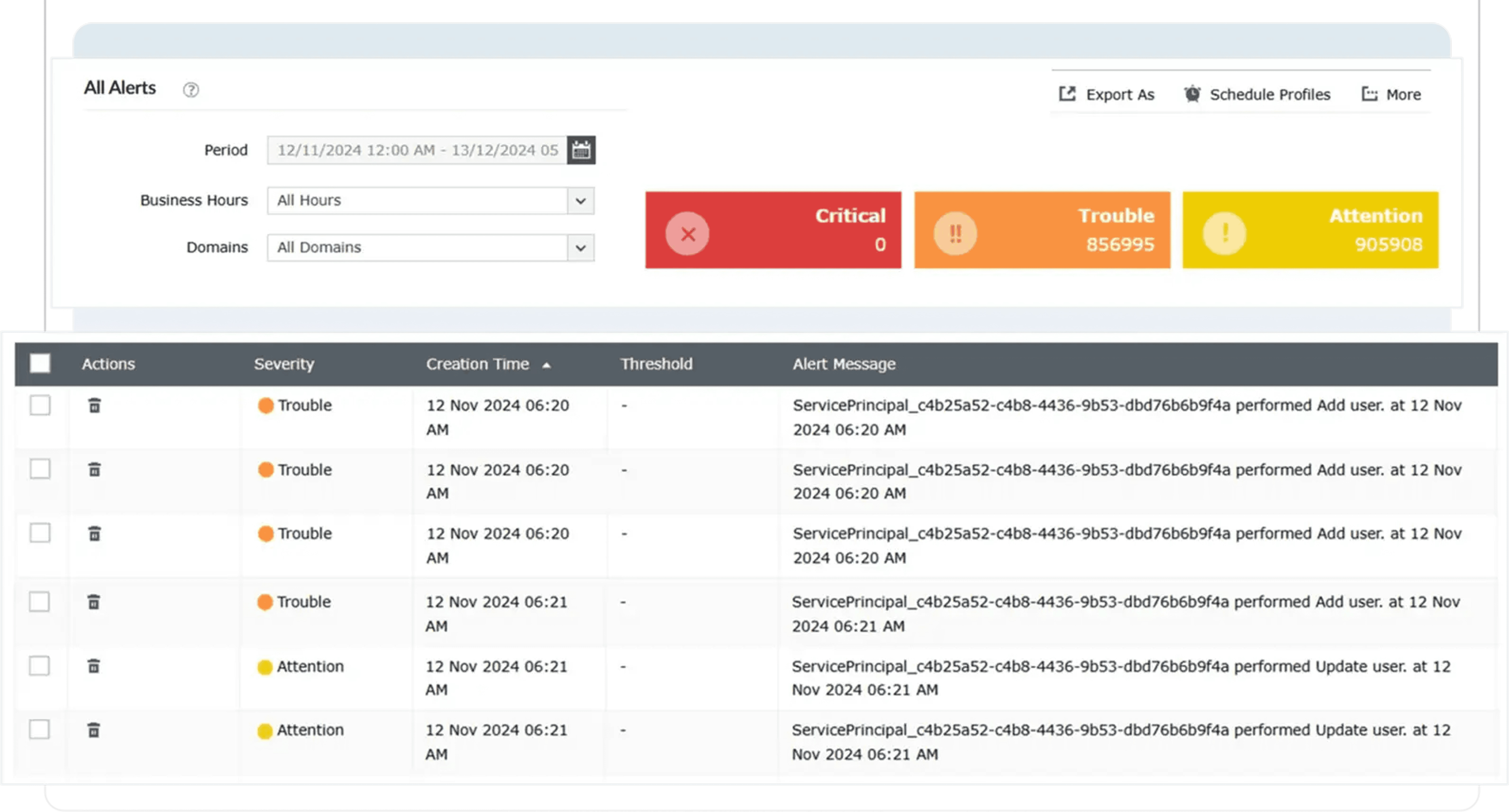
Get instant alerts for suspicious activity, failures, and changes with customizable severity levels to respond quickly and protect your environment.

Work smarter, not harder

Automate tasks and workflows using reports, CSVs, and shared inputs to reduce errors, save time, and manage operations efficiently.

Stay ahead of service issues

Monitor Microsoft 365 services in real time, detect outages, and respond quickly to security threats like ransomware, phishing, and malware.

Secure and recover communications

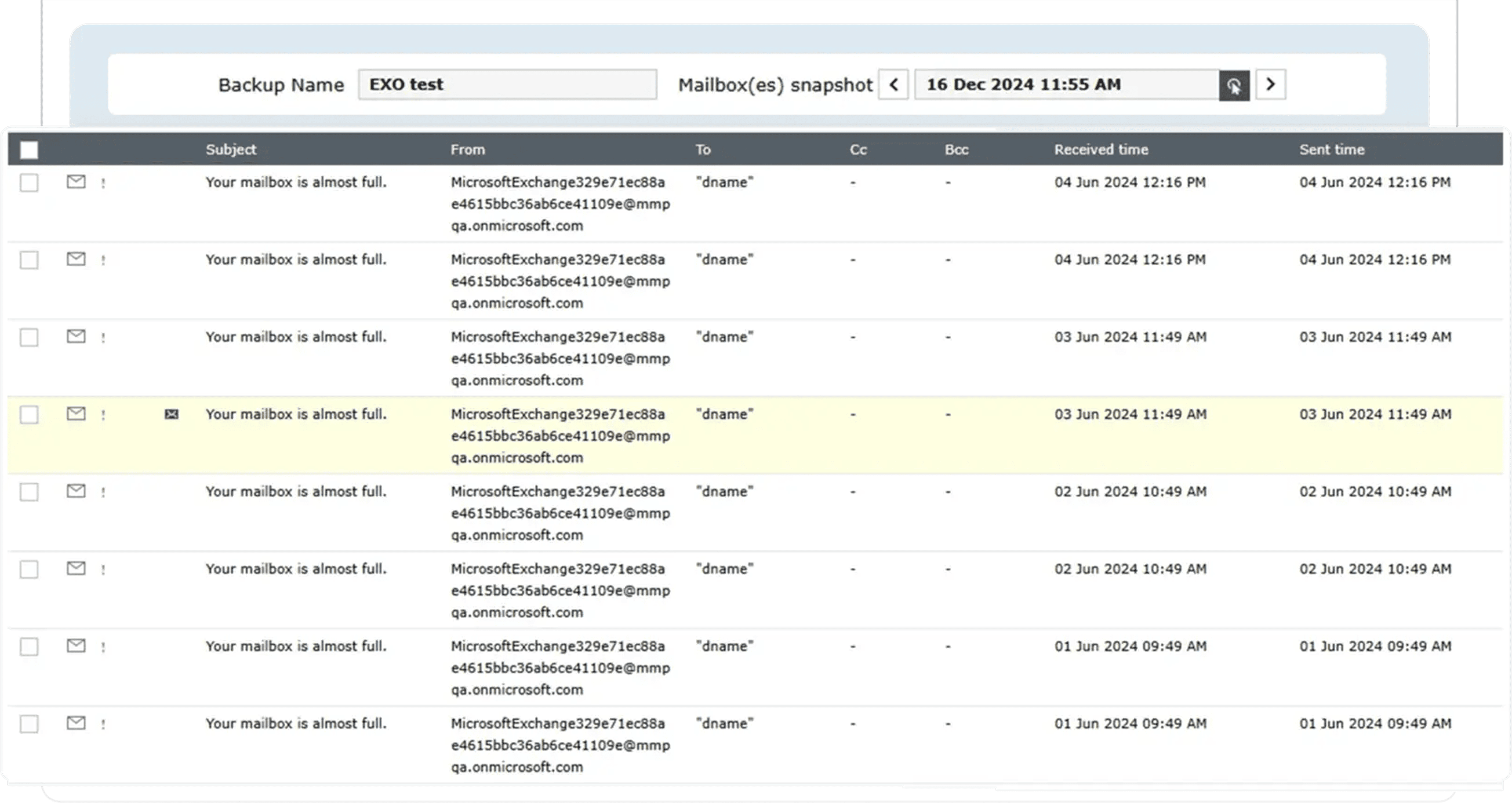
Protect Exchange Online with backups, granular restores, and retention policies while ensuring compliance and quick recovery from data loss or threats.

Secure access and streamline operations

Use role-based access and delegation to manage tasks securely across teams while maintaining control over sensitive Microsoft 365 data.

How M365 Manager Plus Enhances Your Microsoft
365 Environment 

Enhance Protection 

Monitor your Microsoft 365 environment continuously with real-time alerts and automated threat detection to stay ahead of security risks. 

Comprehensive Administration 

Use a single console for reporting, user and device management, automation, and monitoring. Automate routine tasks to improve efficiency and reduce manual effort. 

Improved Productivity 

Centralize provisioning, device management, and routine operations to save time. Automate backups, scheduling, and notifications to eliminate repetitive work. 

Complete Customization 

Customize reports with filters, formats, and metrics. Schedule reports and use templates, audit alerts, and role-based access for secure and efficient operations.

What M365 Manager Plus Can Do For You 

Mailbox Content Reports

Get detailed reports on the contents of all mailboxes in your organization and filter with various parameters such as the size of folders, message count, mail subject, and attachment file size.

Mailbox Size Reports

For all the mailboxes in your organization, view information on the current mailbox size, size restrictions, and mailbox size versus allocated quota statistics instantly.

Public Folders Report

View the public folders available in your Microsoft 365 setup, including their names and paths. See whether or not public folders are mail-enabled, if they have subfolders, if they have a size limit, and more.

Mail Traffic Reports

See a detailed overview of the mail traffic in your organization and in each individual mailbox. Easily identify the top mail senders and receivers, as well as the top spam and malware recipients easily.

Outlook Web Access (OWA) Reports

Monitor user activity on OWA with data on logon times, the browsers and operating systems users logged on from, and users that have been locked out.

Shared Mailbox Access Report

Provides an audit trail of user activities across all shared mailboxes, with details on who accessed the mailbox, who owns the mailbox, when the mailbox was accessed, operation that have been performed from the mailbox, and more.

OWA Reports

Monitor user activity on Outlook Web Access by gathering data on logon times, the browsers and operating systems users log on from, and locked out users.

Azure AD Reports

Gain visibility and knowledge on users, groups, contacts, and licensing with the exhaustive preconfigured reports.Learn about inactive, deleted, and licensed users; security and distribution groups; soon to expire licenses; and more.

Microsoft 365 Group Reports

Gain valuable insight into your Microsoft 365 groups with detailed, preconfigured reports on security groups, distribution groups, group sizes, group members, and empty groups.

Microsoft 365 User License Report

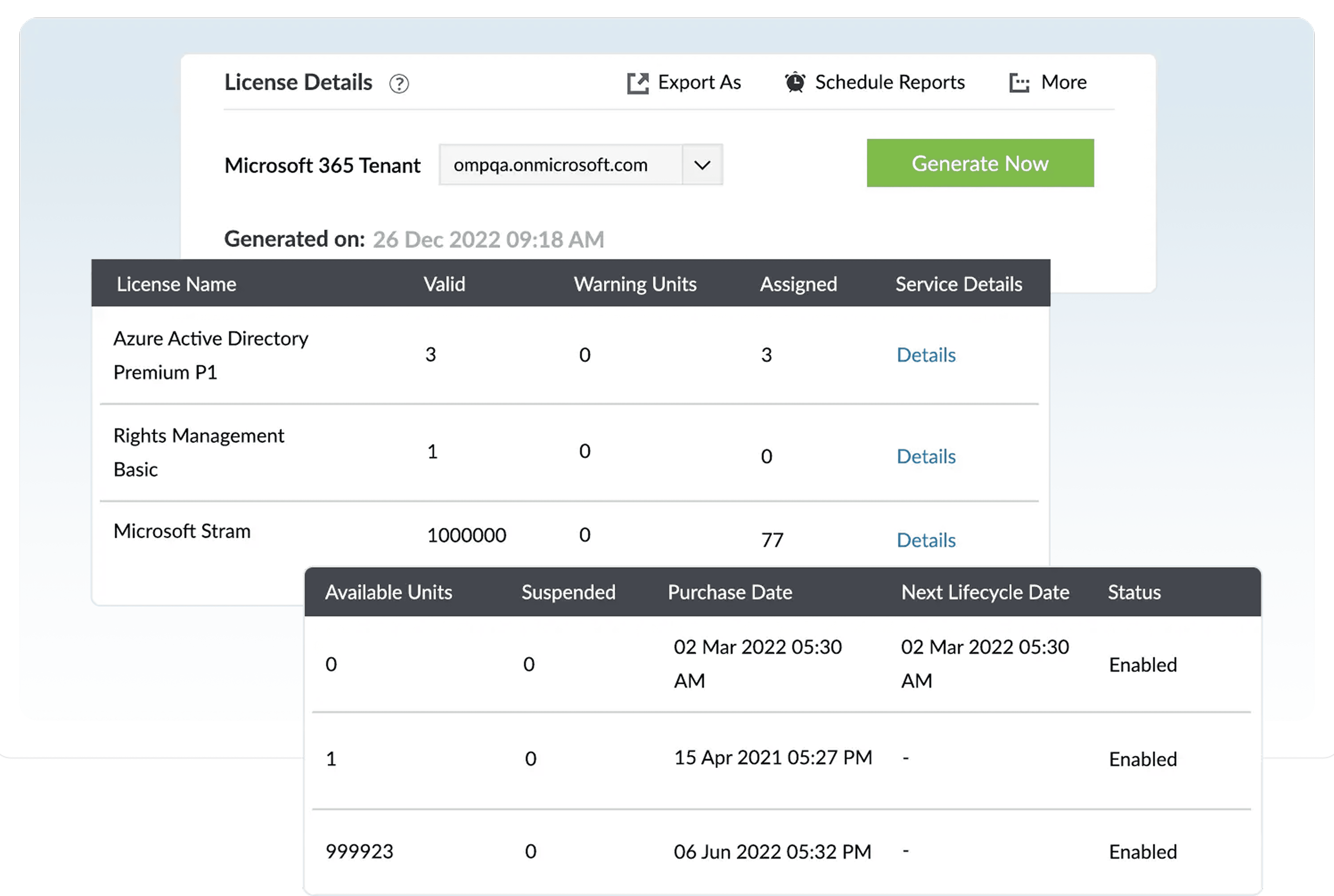
View the real-time license status of Microsoft 365 and other Microsoft business applications to identify users with expired licenses and manage licenses effortlessly.

Mobile Devices Reports

Improve your management of ActiveSync-enabled mobile devices with reports on mobile devices, policy details, status information, ActiveSync usage, and more.

Mobile Devices Reports

Improve your management of ActiveSync-enabled mobile devices with reports on mobile devices, policy details, status information, ActiveSync usage, and more.

Security and Compliance

Keep track of admin and user activities with details on who performed what action and when; monitor shared mailboxes, litigation hold and in-place hold enabled mailboxes to ensure security and Compliance.

OneDrive for Business Reports

Keep track of user activities on files in OneDrive for Business by gathering real-time information on uploads, downloads, accesses, modifications, and more.

OneDrive File Modifications Report

Track the modifications made to files to maintain file integrity.

OneDrive Files Accessed Report

Gain complete visibility on files and folders in OneDrive for Business with details on who accessed what file and when.

OneDrive Uploads Report

Retrieve details on the file uploads made by users to keep an eye on user activities.

OneDrive File Operations Report

See who copied, moved, renamed, restored, or deleted files to detect security breaches.

OneDrive Deleted Files Report

Detect file deletions to keep yourself informed of user activities so you can detect breaches.

OneDrive Downloads Report

Track file downloads with details on who downloaded what file and when.

OneDrive Allowed/Blocked Device Reports

Get details on devices that have been permitted to, or blocked from, syncing with OneDrive for Business. Details include device IP address, device name, user name, and more.

OneDrive Allowed/Blocked Device Reports

Get details on devices that have been permitted to, or blocked from, syncing with OneDrive for Business. Details include device IP address, device name, user name, and more.

OneDrive Sharing Reports

Retrieve details on sharing invitations that have been sent, accepted, or revoked, as well as access requests and company link activities.

Teams usage reports

Gain deep insights with our detailed reports on team activities, user count based on device type and activity type, device usage, and more.

General reports

Get an exhaustive view of Microsoft Teams in your organization, with reports on team details, lists of channels, member details of each team, members count in each team, and more.

Export Reports

Access reports offline or print them for later use by exporting to CSV, PDF, XLSX, and HTML formats.

Custom Reports

Customize default reports with built-in filters to refine for your specific needs and remove any unwanted data.

Embed and Publish Reports

Embed your reports and dashboards across websites, wikis, and applications for a wider audience. Publish reports to make them accessible via local LAN.

Schedule Reports

Sit back and let the reports come to you. Schedule when the reports should be generated and delivered to you via email.

Delegate Microsoft 365 Reporting

Securely give help desk technicians and IT staff access to Microsoft 365 reports without providing them access to the Microsoft 365 admin center.

Exchange Admin Activities

Audit admin activities like mailbox creation and deletion, as well as changes to mailbox permissions, delegates, size, and more.

Exchange User Activities

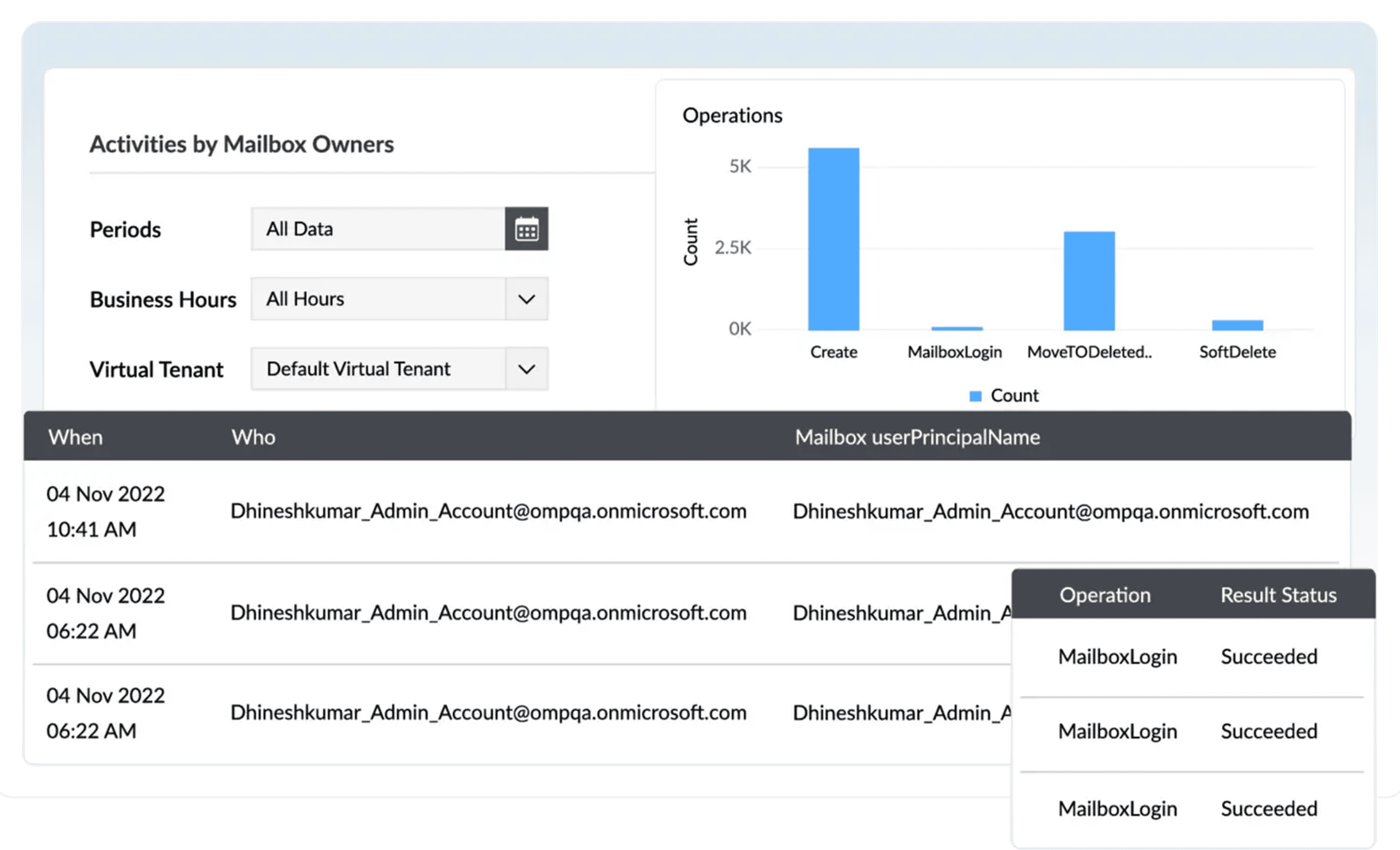
Track activities of mailbox owners, non-owners, and delegates, including mailbox logon activity, send-as right usage, and more. 
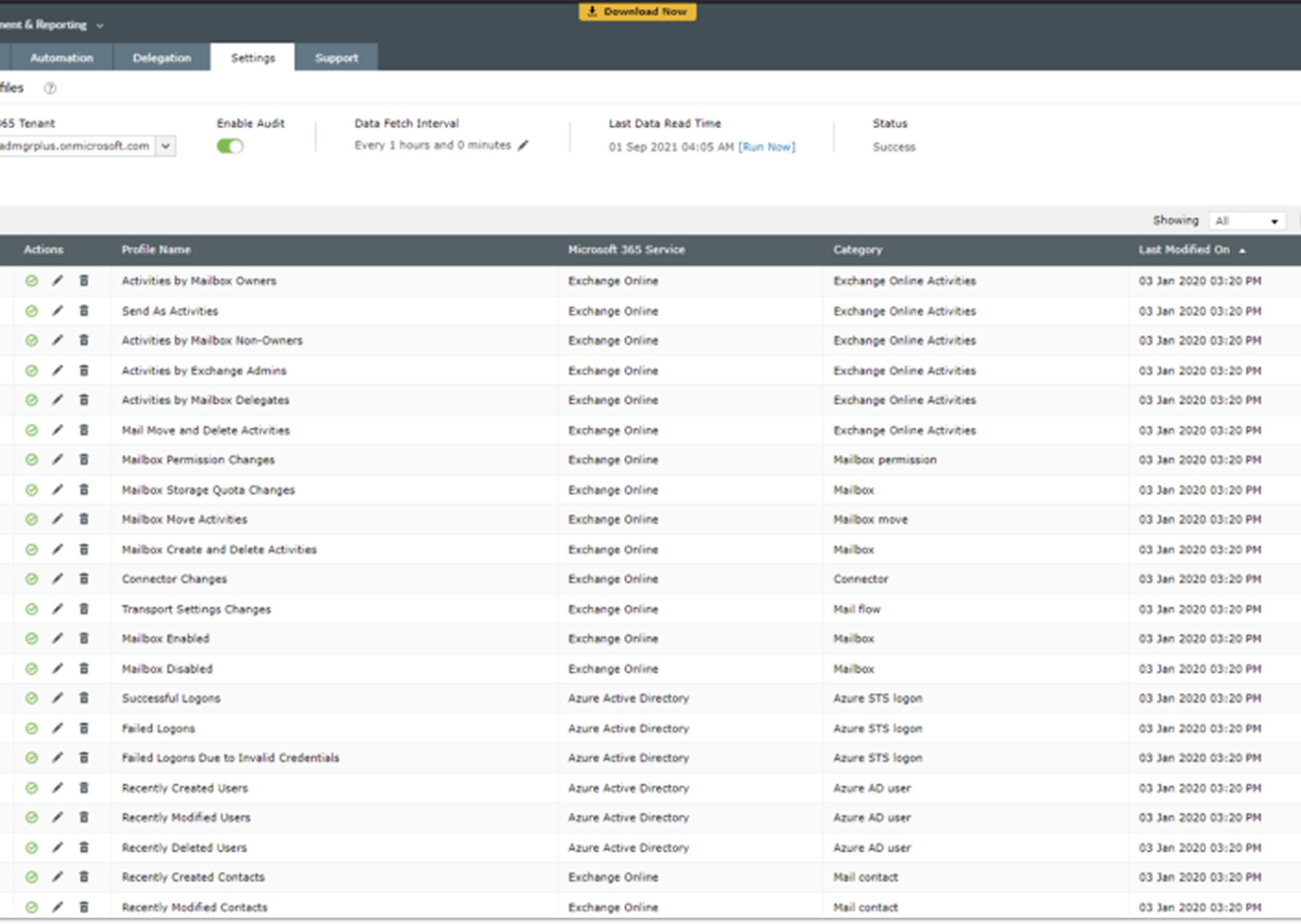
Mailbox Property Changes

Audit modified user attributes, like name, phone number, microsoft, department, and more.

Mailbox Permission Changes

Retrieve audit details on mailbox permission changes, including information on who made what permission change and when.

Spam and Malware Detection

Retrieve audit details on messages that are marked as spam, blocked based on content, sent by blocked users, filtered by transport rules, and more.

Public Folders

View audit details on public folders that were created, modified, or deleted. Audit created, accepted, and denied synchronization and migration requests.

Mobile Device Auditing

Get audit log details on mobile device configurations, including details on mobile device policies, access level changes, and deleted mobile devices.

Calendar Activities

Audit mailbox calendar settings to see text message settings for calendar events and more.

OWA Activities

Audit OWA mailbox policies, mailbox configurations, OWA calendar settings, and more with the utmost detail.

License Activities

Closely monitor license changes made in Azure AD to effectively manage your licenses.

User Administration Activities

Get audit details on user creation, modification, and deletion carried out in Azure AD.

Password Activities

Audit reset or changed user passwords, modified credentials, and forced password changes.

Group Administration Activities

View audit details about created, modified, and deleted user groups. Be aware of who makes membership changes in groups.

User Logon Activities

Keep user login activities in check. Audit successful and failed login attempts made by users with details on the application they used, client IP, and more.

Role Administration Activities

Track when an admin assigns a user to the admin role, removes a user from the admin role, or modifies company contact information.

Application Administrative Activities

Audit application admin activities, including when an admin adds or deletes credentials to a service principal, delegation entry, or service principal.

User Property Changes

Audit display name changes, contact information changes, and other user attribute changes.

Group Property Changes

Audit changes to group names, email addresses, and other group attributes.

Sharing Activities

View audit details about sharing invitations, company-wide sharing links, anonymous links, access requests, as well as shared files, folders, and sites.

File and Folder Activities

Audit created, modified, deleted, renamed, copied, or restored files to closely monitor file and folder changes.

Sync Activities

See which files are uploaded to and downloaded from OneDrive for Business, and which devices are allowed to sync or are blocked from syncing.

Power BI Reports

Use detailed audit reports to track the Power BI reports that users have created, modified, deleted, exported, printed, or downloaded.

Power BI Dashboards

Get real-time auditing details on the dashboards that users have created, viewed, modified, deleted, printed, or shared.

Admin Activities

Audit trial subscriptions, created and deleted Power BI groups, viewed usage metrics, created and deleted organizational content packs, and other admin portal activities.

User Logons

Monitor user logon activities to detect forced logons, a common sign of malicious activity, to ensure your organization complies with various industry mandates.

Team Events

Track user activity and trends by auditing the creation of teams and channels. Schedule these audit reports and have them automatically emailed to your inbox.

Setting Changes

Identify whether your workplace has been compromised by keeping track of organization, team, and channel setting changes. Run audit reports to see who made what change and when.

EOP DLP

View audit information on created, deleted, and modified Data Loss Prevention rules and policies, as well as a list of retrieved sensitive information types.

eDiscovery

Audit eDiscovery administrators and members, viewed and deleted eDiscovery cases, case hold rules, and more.

EOP Users and Groups

See who has viewed and retrieved the list of user objects, group objects, and recipient objects.

Modify SMTP Addresses

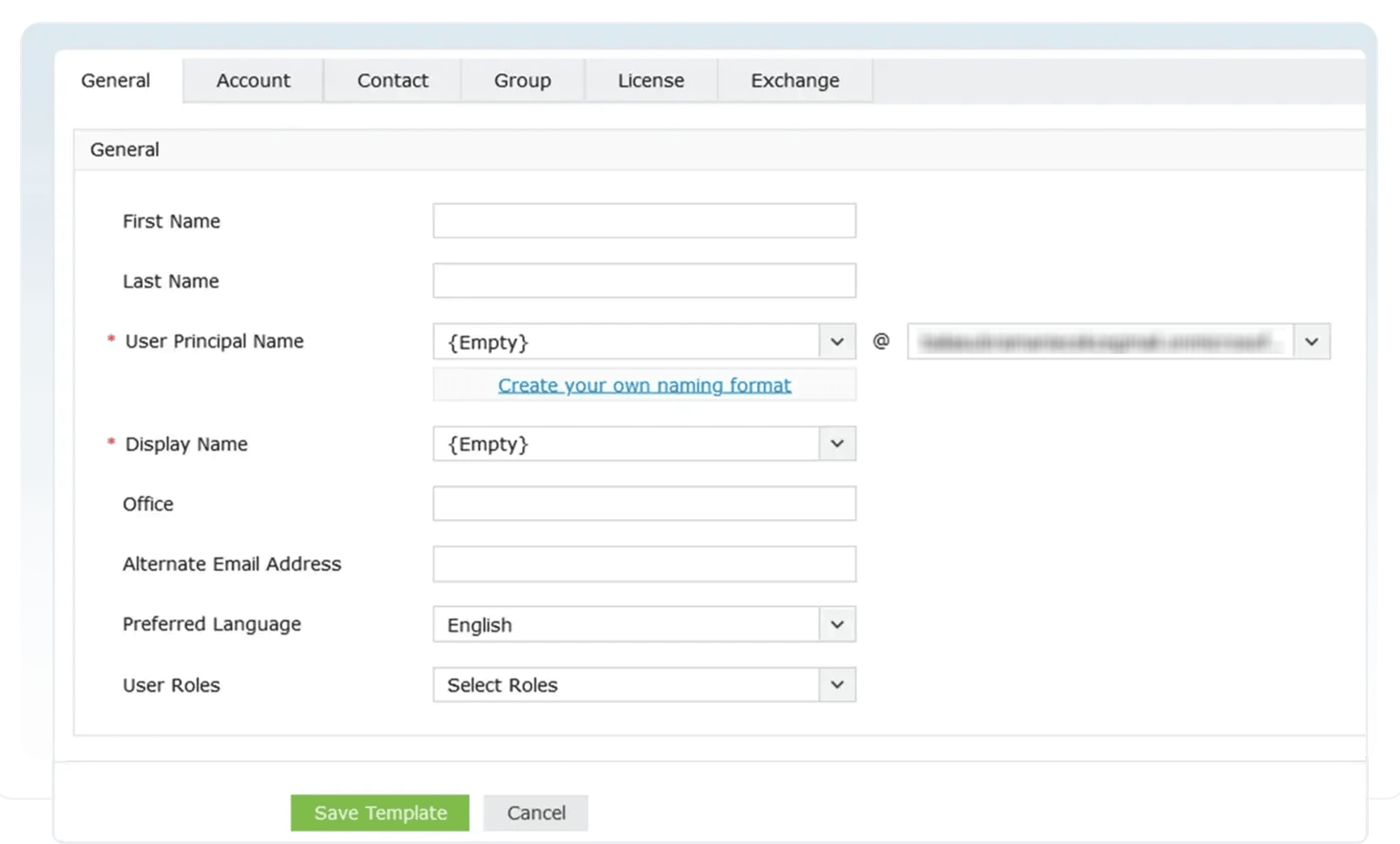
Easily add or modify users’ primary SMTP addresses and proxy addresses and ensure they all map to the correct mailboxes. Audit admin activities like mailbox creation and deletion, as well as changes to mailbox permissions, delegates, size, and more.

Enable/Disable Mailboxes in Bulk

Simply import a list of mailboxes from a CSV file or enter mailbox names directly to enable or disable them.

Configure Mail Forwarding

Forward users’ emails to other mailboxes and give them the option to retain a copy.

Set Mailbox Features

Determine how users access mailboxes by enabling or disabling mailbox features, including IMAP, MAPI, POP, OWA for devices, and EWS, for a single mailbox or a group of mailboxes.

Enable/Disable Clutter

Manage Clutter settings for mailboxes in bulk to automatically process email messages and move low priority messages out of the inbox and into the Clutter folder.

Configure Mailbox Auto Reply

Enable auto reply for a single mailbox or multiple mailboxes and modify the auto reply message for internal and external recipients.

Change Mailbox Audit Settings

Enable or disable mailbox audit logging to track mailbox access by mailbox owners, delegates, and administrators.

Edit Address Book Policies and Address Lists

Change address policies for multiple mailboxes at once and hide or unhide mailboxes from address lists.

Activate Litigation Hold

Define Litigation Hold owners and place mailboxes on Litigation Hold indefinitely to preserve all mailbox content, including deleted items and original versions of modified items.

Delete or Restore Users

Delete unwanted user accounts or restore previously deleted user accounts. Select user accounts manually or import a list of users using a CSV file.

Reset Passwords

Import a list of users whose passwords you would like to reset, or search for specific users and reset their passwords manually. Enter a specific password, or let m365 Manager plus assign a random password.

Edit Multi-Factor Authentication (MFA) Settings

Configure the MFA settings for a list of users imported or selected manually. Choose to enable/disable MFA and select the MFA methods that each user can use, and choose a default MFA method for selected users.

Block or Unblock Users

Block or unblock users either individually or in bulk with just a few clicks. Delete or restore users imported from a list instantly from your Azure AD.

Modify User Attributes

Edit address and contact attributes, and change users’ managers, domains, and MFA techniques in bulk.

Manage Address Attributes

Modify users’ address attributes in bulk. Set different values for address attributes while modifying them in bulk.

Manage site groups

Manage your SharePoint site groups in just a few clicks. Create, delete, and modify group memberships and their properties swiftly with bulk operations and templates.

Manage site permissions

Set up and manage SharePoint Online site permissions with ease. Add, remove, and modify SharePoint Online site permissions in bulk with different values for each site. Audit created, modified, deleted, renamed, copied, or restored files to closely monitor file and folder changes.

Manage channels

Create, update, and delete channels in bulk from a centralized console with ManageEngine m365 Manager plus.

Manage teams

Create, update, and delete teams in bulk, or simply add them from existing groups. Apply granular rules to manage teams more securely

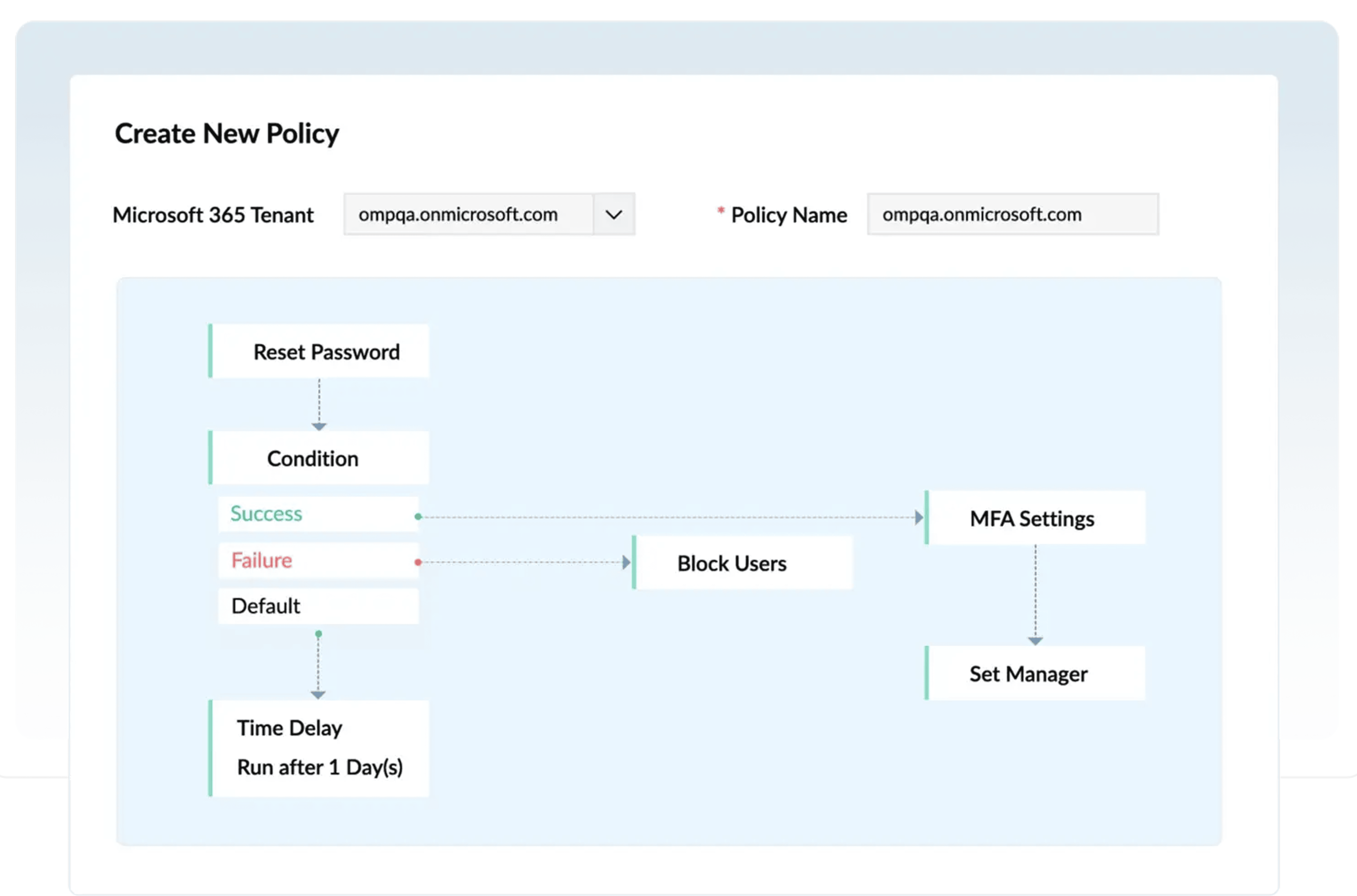
Creates automation policies

Event-driven policies carry out chains of tasks automatically at specified intervals.

Automates management tasks

Once scheduled, the tool executes individual user or mailbox management tasks at specified intervals. Monitor user logon activities to detect forced logons, a common sign of malicious activity, to ensure your organization complies with various industry mandates.

Supports multiple data sources

For the automated tasks, the tool accepts CSV files, m365 Manager plus reports, and shared locations as input.

Audits admin activities

With detailed audit reports, the tool keeps track of the automation policies created, modified, delegated, and modified by admins and technicians.

Creation rules

Create rules that auto-populate fields based on conditions specified. For example, create a rule that assigns John as the manager for the users whose Department is Finance.

Creation templates

Pre-configure all the standard values and settings such as password complexity, Microsoft address, group membership, permission to resources, etc., leaving only the variables like user name, personal mobile number, personal address, etc. to the help desk technicians.

Templates for automation

Use management templates while creating automation policies with m365 Manager plus. This speeds up your management processes as the templates come with predefined values and automation policies run at specified intervals without any human intervention.Audit eDiscovery administrators and members, viewed and deleted eDiscovery cases, case hold rules, and more.

Pre-define values

With the help of creation templates, IT admins can standardize and pre-define certain user and mailbox settings like naming format, mailbox storage limit, Microsoft address, mailbox permissions, license type, and more. The same applies to groups and contacts as well.

Health and Performance Monitoring

Endpoint monitoring

Monitor the health and performance of Microsoft 365 service endpoints to keep track of their availability.

Service monitoring

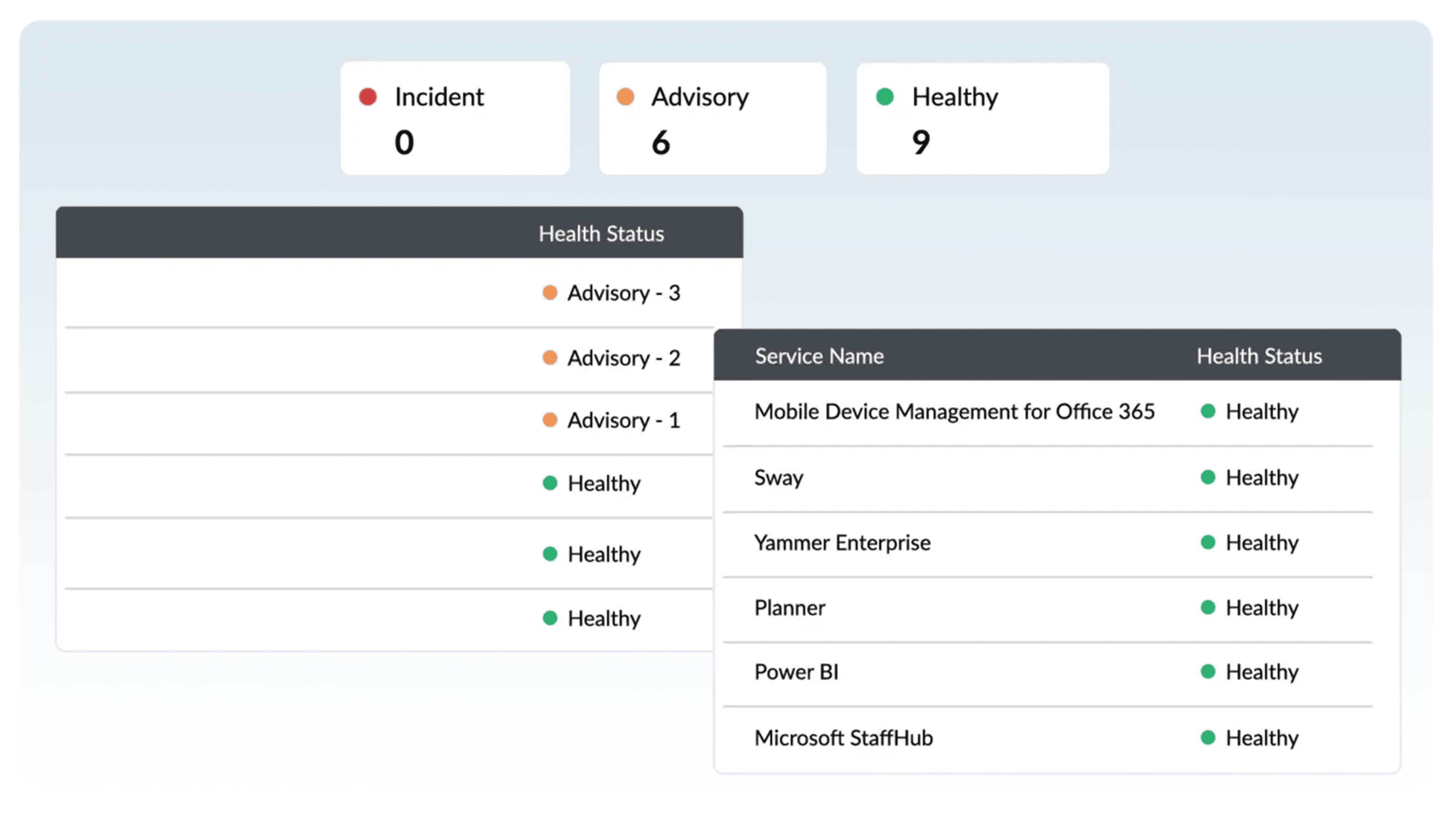
Monitor the health and performance of Exchange Online, Azure Active Directory, OneDrive for Business, Microsoft Teams, and other major Microsoft 365 services from a single console.

Detailed dashboard

View granular details such as the number of incidents and advisories that are occurring on a service’s features and endpoints, how many users will be affected by a particular incident, the current status of each incident, and more.

Real-time alerts

Monitor Microsoft 365 services and endpoints around the clock, and receive email alerts on service outages in real-time without any delay.Determine how users access mailboxes by enabling or disabling mailbox features, including IMAP, MAPI, POP, OWA for devices, and EWS, for a single mailbox or a group of mailboxes.

Graphical illustration

View graphs that illustrate the health and performance of your Microsoft 365 services and endpoints.

Historical data

Access historical service health monitoring data that’s older then 30 days, which isn’t possible using the native reporting tools in the Microsoft 365 portal.

Microsoft 365 Help Desk Delegation

Domain-based Delegation

If there are multiple domains in your organization, you can create roles with domain-specific tasks. Having domain-based admins can help you keep a closer eye on your domain.

Cross-tenant Delegation

You can configure more than one Microsoft 365 tenant in m365 Manager plus, or delegate the rights of one tenant to another to make sure critical tasks are always taken care of. Monitor the health and performance of Exchange Online, Azure Active Directory, OneDrive for Business, Microsoft Teams, and other major Microsoft 365 services from a single console.

Security Delegation

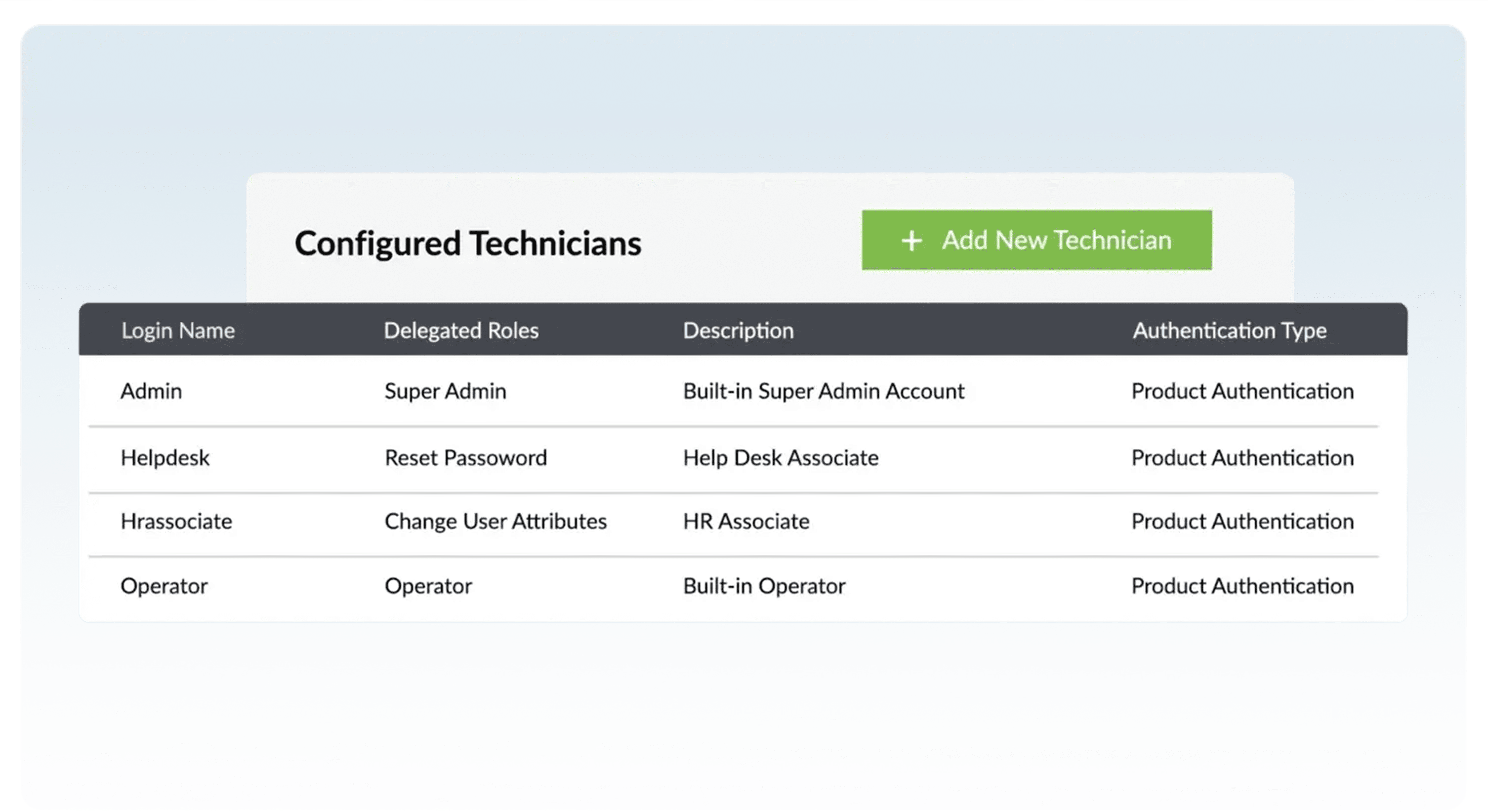
Assign security-related tasks such as password resets, account unlocks, blocking users, etc. to one user so they can help keep an eye on your Microsoft 365 environment. Once you’ve created a role with all the right security-related tasks, delegate that role to a trusted technician to make sure your setup is running smoothly.

Technician Audit Log

Track what a technician did with their delegated rights. For example, find out which Active Directory objects they created, modified, and deleted, which reports they generated, which alerts they created, and more.

Customized Roles

Create custom roles according to your needs. Select any combination of management, reporting, auditing, and alerting tasks to create a role. There’s no limit to the amount of roles you can delegate to a technician, which provides flexibility when delegating admin rights to users.

Non-admin Delegation

Create and delegate roles to non-admins users. You can delegate miscellaneous tasks such as resetting passwords, changing contact details, etc. to trusted users to reduce help desk tickets. For example, you can delegate the right to update employee details to your organization’s HR manager.

Attribute Level Delegation

Attribute level delegation lets you delegate tasks to users without losing control of your Microsoft 365 setup. Admins are often skeptical about delegating admin rights to users, as things can get out of hand if not properly monitored. To assuage these fears, m365 Manager plus lets you delegate particular tasks rather than giving a person full admin rights.

Several Deployment Options To Manage SSH keys And SSL/TLS
Certificates Across Your Network

On-Premises Deployment 

Install M365 Manager Plus on your local Windows or Linux infrastructure to maintain full control over your Microsoft 365 management and auditing data.
Ensure compliance with regulatory standards such as HIPAA, SOX, and GDPR by keeping all sensitive reporting data within your organization’s secure environment.
Access the management console through a secure, web-based interface that can be configured for local LAN access or secure remote access via a public hostname.

Direct Deployment from
the Server

Manage multiple Microsoft 365 tenants directly from a single centralized server without needing any complex PowerShell or Graph API scripting.
Execute bulk operations—such as user provisioning, license management, and mailbox configurations—directly from the on-premises console to your cloud environment.
Utilize built-in management templates and automated workflows to push standardized changes across Microsoft Entra ID, Exchange Online, and Microsoft Teams seamlessly.

Failover Service (FOS)

Ensure uninterrupted 24×7 monitoring and auditing of your Microsoft 365 environment with high-availability support and redundant failover server instances.
Leverage an Active-Passive failover model where a standby server automatically takes over operations if the primary server goes offline, maintaining service continuity.
Guarantee consistent access to critical security alerts and scheduled reports with automated data synchronization between your primary and secondary server nodes.

M365 Manager Plus Benefits

Monitor the health of Exchange Online, Azure Active Directory, OneDrive for Business, Skype for Business, and other major Microsoft 365 services around the clock from one, central location. 

M365 Manager Plus provides over 700 preconfigured reports on Exchange Online, Azure Active Directory, Skype for Business, OneDrive for Business, and other Microsoft 365 services. 

With built-in audit reports track every event happening in your Microsoft 365 environment to take preemptive actions and avoid dire consequences. 

It allows to manage users, mailboxes, licenses, and contacts in bulk, substantially reducing the amount of time spent on management tasks. 

Select any combination of reporting, management, auditing, and alerting tasks to create your own customized roles. 

See M365 Manager Plus in action. Book a personalized demo or launch an instant walkthrough now. 

Upgrade to a Fully Managed Security Posture

Introducing KIDAN’s Endpoint Management and Security as a Service powered by our 24/7 Swiss-led Technology Operations Center (TOC)

24/7 Proactive Security & Threat Mitigation

Our TOC operates around the clock to monitor your endpoints. We don’t just send you alerts; we actively investigate, validate, and remediate threats before they can impact your operations. This includes vulnerability management, patch deployment, and enforcing security configurations across your entire fleet of devices.

Expert Management & Optimization

Your Endpoint Central platform will be managed and optimized by certified engineers who live and breathe this technology. We handle all software deployments, policy configurations, and routine maintenance, ensuring the tool is always performing at its peak and aligned with the latest security best practices.

Strategic Reporting & Visibility

Move beyond raw data. We provide you with clear, executive-level monthly reports that translate technical activity into business-relevant insights. Understand your security posture, see the threats we’ve neutralized, and demonstrate compliance with ease.

We’ve been redefining IT for enterprises, excellence in every solution.

A Holistic Microsoft 365 Administration
And Security Solution

Manage users, groups, contacts, mailboxes, public folders, mobile devices, sites, Teams, channels, team members, and more from a single console.

Create and modify Microsoft 365 objects in bulk by simply importing a CSV file.

Notify users of password expiration to prevent account lockouts, and reset passwords in bulk.

Standardize and predefine user, group, contact, mailbox, and license settings with custom object creation templates.

Ensure secure sign-ins by configuring multi-factor authentication for users in bulk.

Get detailed information on all facets of Microsoft 365 services with over 700 preconfigured reports.

Use built-in filters to customize reports based on period of generation, attributes, users, and more.

Schedule reports to be generated periodically, and have them emailed to you.

Export the reports to multiple formats including PDF, XLSX, HTML, and CSV.

Embed report summaries in the form of graphs and charts as widgets in the dashboard for quick understanding.

Perform extensive audits on admin and non-admin activities in all Microsoft 365 services to ease your security concerns.

Prevent security breaches with audit reports on malware, data loss prevention, failed logons, and more.

Take immediate action with real-time notifications for critical events.

Configure custom audit and alert profiles for business or non-business hours.

Archive your audit logs as password-protected, and have them restored when needed.

Back up Exchange Online emails, calendar entries, contacts, and tasks with periodic incremental backups, and restore them fully or granularly based on your need.

Monitor Microsoft 365 features and endpoints around-the-clock.

Get instant notifications when a decline in service health is detected

Gain access to historical Microsoft 365 service health monitoring data older than 180 days.

Ensure secure sign-ins by configuring multi-factor authentication for users in bulk.

Automate routine management tasks such as user provisioning, mailbox creation, license modification, and more.

Keep track of changes made to automation policies by admins and technicians with detailed audit reports.

Create event-driven policies to execute automated tasks at specified time intervals.

Use CSV files, M365 Manager Plus reports, and shared locations as inputs for configuring automation policies.

How KIDAN Works with You

Choose the Model That Fits You Best 

We don’t just provide software we partner with you to ensure it delivers real, lasting value. Whether you’re looking for light-touch guidance or full-scale operational support, we offer flexible service models tailored to your needs. 

License + Expert Guidance

Start with the right license and unlock full value.
Already have the tool or just getting started? We’ll help you provision the right licenses and guide you to unlock the full potential of your investment. Think of us as your strategic advisor always available, never intrusive.

Implementation & Onboarding

We’ll help you set up, onboard, and train your team.

We’ll help you set up, onboard, and train your team.Need help getting up and running? We’re with you every step of the way from setup and configuration to onboarding and training. Our experts ensure your team is confident, capable, and ready to go.

Fully Managed Service

We manage everything so you don’t have to. 

Prefer to stay hands-off? Let us run the tool for you. We’ll handle everything monitoring, maintenance, updates, and optimization so you can focus on what matters most: your
business.

Introducing KIDAN’s Endpoint Management and Security as a Service powered by our 24/7 Swiss-led Technology Operations Center (TOC)

1 Minute Guided Tour of M365 Manager Plus 

Several Deployment Options To Manage SSH keys And SSL/TLS
Certificates Across Your Network

On-Premises Deployment 

Install M365 Manager Plus on your local Windows or Linux infrastructure to maintain full control over your Microsoft 365 management and auditing data.
Ensure compliance with regulatory standards such as HIPAA, SOX, and GDPR by keeping all sensitive reporting data within your organization’s secure environment.
Access the management console through a secure, web-based interface that can be configured for local LAN access or secure remote access via a public hostname.

Direct Deployment from
the Server

Manage multiple Microsoft 365 tenants directly from a single centralized server without needing any complex PowerShell or Graph API scripting.
Execute bulk operations—such as user provisioning, license management, and mailbox configurations—directly from the on-premises console to your cloud environment.
Utilize built-in management templates and automated workflows to push standardized changes across Microsoft Entra ID, Exchange Online, and Microsoft Teams seamlessly.

Failover Service (FOS)

Ensure uninterrupted 24×7 monitoring and auditing of your Microsoft 365 environment with high-availability support and redundant failover server instances.
Leverage an Active-Passive failover model where a standby server automatically takes over operations if the primary server goes offline, maintaining service continuity.
Guarantee consistent access to critical security alerts and scheduled reports with automated data synchronization between your primary and secondary server nodes.

How KIDAN Works with You

Choose the Model That Fits You Best 

We don’t just provide software we partner with you to ensure it delivers real, lasting value. Whether you’re looking for light-touch guidance or full-scale operational support, we offer flexible service models tailored to your needs. 

License + Expert Guidance

Start with the right license and unlock full value.
Already have the tool or just getting started? We’ll help you provision the right licenses and guide you to unlock the full potential of your investment. Think of us as your strategic advisor always available, never intrusive.

Implementation & Onboarding

We’ll help you set up, onboard, and train your team.

We’ll help you set up, onboard, and train your team.Need help getting up and running? We’re with you every step of the way from setup and configuration to onboarding and training. Our experts ensure your team is confident, capable, and ready to go.

Fully Managed Service

We manage everything so you don’t have to. 

Prefer to stay hands-off? Let us run the tool for you. We’ll handle everything monitoring, maintenance, updates, and optimization so you can focus on what matters most: your
business.

Introducing KIDAN’s Endpoint Management and Security as a Service powered by our 24/7 Swiss-led Technology Operations Center (TOC)

Key Features of M365 Manager Plus 

Manage with confidence

Simplify operations with tools that streamline management and give full control over Microsoft 365 without PowerShell or Graph API scripting.

Get a bird’s-eye view

Access over 700 reports to track usage, optimize resources, and maintain compliance across Microsoft 365 with actionable insights and scheduling.

Always be in the know

Monitor activity with real-time audits and logs, using custom profiles and alerts to focus only on critical events.

Be notified and be prepared

Get instant alerts for suspicious activity, failures, and changes with customizable severity levels to respond quickly and protect your environment.

Work smarter, not harder

Automate tasks and workflows using reports, CSVs, and shared inputs to reduce errors, save time, and manage operations efficiently.

Stay ahead of service issues

Monitor Microsoft 365 services in real time, detect outages, and respond quickly to security threats like ransomware, phishing, and malware.

Secure and recover communications

Protect Exchange Online with backups, granular restores, and retention policies while ensuring compliance and quick recovery from data loss or threats.

Secure access and streamline operations

Use role-based access and delegation to manage tasks securely across teams while maintaining control over sensitive Microsoft 365 data.

How M365 Manager Plus Enhances Your Microsoft
365 Environment 

Enhance Protection 

Monitor your Microsoft 365 environment continuously with real-time alerts and automated threat detection to stay ahead of security risks. 

Comprehensive Administration 

Use a single console for reporting, user and device management, automation, and monitoring. Automate routine tasks to improve efficiency and reduce manual effort. 

Improved Productivity 

Centralize provisioning, device management, and routine operations to save time. Automate backups, scheduling, and notifications to eliminate repetitive work. 

Complete Customization 

Customize reports with filters, formats, and metrics. Schedule reports and use templates, audit alerts, and role-based access for secure and efficient operations.

What M365 Manager Plus Can Do For You 

Mailbox Content Reports

Get detailed reports on the contents of all mailboxes in your organization and filter with various parameters such as the size of folders, message count, mail subject, and attachment file size.

Mailbox Size Reports

For all the mailboxes in your organization, view information on the current mailbox size, size restrictions, and mailbox size versus allocated quota statistics instantly.

Public Folders Report

View the public folders available in your Microsoft 365 setup, including their names and paths. See whether or not public folders are mail-enabled, if they have subfolders, if they have a size limit, and more.

Mail Traffic Reports

See a detailed overview of the mail traffic in your organization and in each individual mailbox. Easily identify the top mail senders and receivers, as well as the top spam and malware recipients easily.

Outlook Web Access (OWA) Reports

Monitor user activity on OWA with data on logon times, the browsers and operating systems users logged on from, and users that have been locked out.

Shared Mailbox Access Report

Provides an audit trail of user activities across all shared mailboxes, with details on who accessed the mailbox, who owns the mailbox, when the mailbox was accessed, operation that have been performed from the mailbox, and more.

OWA Reports

Monitor user activity on Outlook Web Access by gathering data on logon times, the browsers and operating systems users log on from, and locked out users.

Azure AD Reports

Gain visibility and knowledge on users, groups, contacts, and licensing with the exhaustive preconfigured reports.Learn about inactive, deleted, and licensed users; security and distribution groups; soon to expire licenses; and more.

Microsoft 365 Group Reports

Gain valuable insight into your Microsoft 365 groups with detailed, preconfigured reports on security groups, distribution groups, group sizes, group members, and empty groups.

Microsoft 365 User License Report

View the real-time license status of Microsoft 365 and other Microsoft business applications to identify users with expired licenses and manage licenses effortlessly.

Mobile Devices Reports

Improve your management of ActiveSync-enabled mobile devices with reports on mobile devices, policy details, status information, ActiveSync usage, and more.

Mobile Devices Reports

Improve your management of ActiveSync-enabled mobile devices with reports on mobile devices, policy details, status information, ActiveSync usage, and more.

Security and Compliance

Keep track of admin and user activities with details on who performed what action and when; monitor shared mailboxes, litigation hold and in-place hold enabled mailboxes to ensure security and Compliance.

OneDrive for Business Reports

Keep track of user activities on files in OneDrive for Business by gathering real-time information on uploads, downloads, accesses, modifications, and more.

OneDrive File Modifications Report

Track the modifications made to files to maintain file integrity.

OneDrive Files Accessed Report

Gain complete visibility on files and folders in OneDrive for Business with details on who accessed what file and when.

OneDrive Uploads Report

Retrieve details on the file uploads made by users to keep an eye on user activities.

OneDrive File Operations Report

See who copied, moved, renamed, restored, or deleted files to detect security breaches.

OneDrive Deleted Files Report

Detect file deletions to keep yourself informed of user activities so you can detect breaches.

OneDrive Downloads Report

Track file downloads with details on who downloaded what file and when.

OneDrive Allowed/Blocked Device Reports

Get details on devices that have been permitted to, or blocked from, syncing with OneDrive for Business. Details include device IP address, device name, user name, and more.

OneDrive Allowed/Blocked Device Reports

Get details on devices that have been permitted to, or blocked from, syncing with OneDrive for Business. Details include device IP address, device name, user name, and more.

OneDrive Sharing Reports

Retrieve details on sharing invitations that have been sent, accepted, or revoked, as well as access requests and company link activities.

Teams usage reports

Gain deep insights with our detailed reports on team activities, user count based on device type and activity type, device usage, and more.

General reports

Get an exhaustive view of Microsoft Teams in your organization, with reports on team details, lists of channels, member details of each team, members count in each team, and more.

Export Reports

Access reports offline or print them for later use by exporting to CSV, PDF, XLSX, and HTML formats.

Custom Reports

Customize default reports with built-in filters to refine for your specific needs and remove any unwanted data.

Embed and Publish Reports

Embed your reports and dashboards across websites, wikis, and applications for a wider audience. Publish reports to make them accessible via local LAN.

Schedule Reports

Sit back and let the reports come to you. Schedule when the reports should be generated and delivered to you via email.

Delegate Microsoft 365 Reporting

Securely give help desk technicians and IT staff access to Microsoft 365 reports without providing them access to the Microsoft 365 admin center.

Exchange Admin Activities

Audit admin activities like mailbox creation and deletion, as well as changes to mailbox permissions, delegates, size, and more.

Exchange User Activities

Track activities of mailbox owners, non-owners, and delegates, including mailbox logon activity, send-as right usage, and more. 

Mailbox Property Changes

Audit modified user attributes, like name, phone number, microsoft, department, and more.

Mailbox Permission Changes

Retrieve audit details on mailbox permission changes, including information on who made what permission change and when.

Spam and Malware Detection

Retrieve audit details on messages that are marked as spam, blocked based on content, sent by blocked users, filtered by transport rules, and more.

Public Folders

View audit details on public folders that were created, modified, or deleted. Audit created, accepted, and denied synchronization and migration requests.

Mobile Device Auditing

Get audit log details on mobile device configurations, including details on mobile device policies, access level changes, and deleted mobile devices.

Calendar Activities

Audit mailbox calendar settings to see text message settings for calendar events and more.

OWA Activities

Audit OWA mailbox policies, mailbox configurations, OWA calendar settings, and more with the utmost detail.

License Activities

Closely monitor license changes made in Azure AD to effectively manage your licenses.

User Administration Activities

Get audit details on user creation, modification, and deletion carried out in Azure AD.

Password Activities

Audit reset or changed user passwords, modified credentials, and forced password changes.

Group Administration Activities

View audit details about created, modified, and deleted user groups. Be aware of who makes membership changes in groups.

User Logon Activities

Keep user login activities in check. Audit successful and failed login attempts made by users with details on the application they used, client IP, and more.

Role Administration Activities

Track when an admin assigns a user to the admin role, removes a user from the admin role, or modifies company contact information.

Application Administrative Activities

Audit application admin activities, including when an admin adds or deletes credentials to a service principal, delegation entry, or service principal.

User Property Changes

Audit display name changes, contact information changes, and other user attribute changes.

Group Property Changes

Audit changes to group names, email addresses, and other group attributes.

Sharing Activities

View audit details about sharing invitations, company-wide sharing links, anonymous links, access requests, as well as shared files, folders, and sites.

File and Folder Activities

Audit created, modified, deleted, renamed, copied, or restored files to closely monitor file and folder changes.

Sync Activities

See which files are uploaded to and downloaded from OneDrive for Business, and which devices are allowed to sync or are blocked from syncing.

Power BI Reports

Use detailed audit reports to track the Power BI reports that users have created, modified, deleted, exported, printed, or downloaded.

Power BI Dashboards

Get real-time auditing details on the dashboards that users have created, viewed, modified, deleted, printed, or shared.

Admin Activities

Audit trial subscriptions, created and deleted Power BI groups, viewed usage metrics, created and deleted organizational content packs, and other admin portal activities.

User Logons

Monitor user logon activities to detect forced logons, a common sign of malicious activity, to ensure your organization complies with various industry mandates.

Team Events

Track user activity and trends by auditing the creation of teams and channels. Schedule these audit reports and have them automatically emailed to your inbox.

Setting Changes

Identify whether your workplace has been compromised by keeping track of organization, team, and channel setting changes. Run audit reports to see who made what change and when.

EOP DLP

View audit information on created, deleted, and modified Data Loss Prevention rules and policies, as well as a list of retrieved sensitive information types.

eDiscovery

Audit eDiscovery administrators and members, viewed and deleted eDiscovery cases, case hold rules, and more.

EOP Users and Groups

See who has viewed and retrieved the list of user objects, group objects, and recipient objects.

Modify SMTP Addresses

Easily add or modify users’ primary SMTP addresses and proxy addresses and ensure they all map to the correct mailboxes. Audit admin activities like mailbox creation and deletion, as well as changes to mailbox permissions, delegates, size, and more.

Enable/Disable Mailboxes in Bulk

Simply import a list of mailboxes from a CSV file or enter mailbox names directly to enable or disable them.

Configure Mail Forwarding

Forward users’ emails to other mailboxes and give them the option to retain a copy.

Set Mailbox Features

Determine how users access mailboxes by enabling or disabling mailbox features, including IMAP, MAPI, POP, OWA for devices, and EWS, for a single mailbox or a group of mailboxes.

Enable/Disable Clutter

Manage Clutter settings for mailboxes in bulk to automatically process email messages and move low priority messages out of the inbox and into the Clutter folder.

Configure Mailbox Auto Reply

Enable auto reply for a single mailbox or multiple mailboxes and modify the auto reply message for internal and external recipients.

Change Mailbox Audit Settings

Enable or disable mailbox audit logging to track mailbox access by mailbox owners, delegates, and administrators.

Edit Address Book Policies and Address Lists

Change address policies for multiple mailboxes at once and hide or unhide mailboxes from address lists.

Activate Litigation Hold

Define Litigation Hold owners and place mailboxes on Litigation Hold indefinitely to preserve all mailbox content, including deleted items and original versions of modified items.

Delete or Restore Users

Delete unwanted user accounts or restore previously deleted user accounts. Select user accounts manually or import a list of users using a CSV file.

Reset Passwords

Import a list of users whose passwords you would like to reset, or search for specific users and reset their passwords manually. Enter a specific password, or let m365 Manager plus assign a random password.

Edit Multi-Factor Authentication (MFA) Settings

Configure the MFA settings for a list of users imported or selected manually. Choose to enable/disable MFA and select the MFA methods that each user can use, and choose a default MFA method for selected users.

Block or Unblock Users

Block or unblock users either individually or in bulk with just a few clicks. Delete or restore users imported from a list instantly from your Azure AD.

Modify User Attributes

Edit address and contact attributes, and change users’ managers, domains, and MFA techniques in bulk.

Manage Address Attributes

Modify users’ address attributes in bulk. Set different values for address attributes while modifying them in bulk.

Manage site groups

Manage your SharePoint site groups in just a few clicks. Create, delete, and modify group memberships and their properties swiftly with bulk operations and templates.

Manage site permissions

Set up and manage SharePoint Online site permissions with ease. Add, remove, and modify SharePoint Online site permissions in bulk with different values for each site. Audit created, modified, deleted, renamed, copied, or restored files to closely monitor file and folder changes.

Manage channels

Create, update, and delete channels in bulk from a centralized console with ManageEngine m365 Manager plus.

Manage teams

Create, update, and delete teams in bulk, or simply add them from existing groups. Apply granular rules to manage teams more securely

Creates automation policies

Event-driven policies carry out chains of tasks automatically at specified intervals.

Automates management tasks

Once scheduled, the tool executes individual user or mailbox management tasks at specified intervals. Monitor user logon activities to detect forced logons, a common sign of malicious activity, to ensure your organization complies with various industry mandates.

Supports multiple data sources

For the automated tasks, the tool accepts CSV files, m365 Manager plus reports, and shared locations as input.

Audits admin activities

With detailed audit reports, the tool keeps track of the automation policies created, modified, delegated, and modified by admins and technicians.

Creation rules

Create rules that auto-populate fields based on conditions specified. For example, create a rule that assigns John as the manager for the users whose Department is Finance.

Creation templates

Pre-configure all the standard values and settings such as password complexity, Microsoft address, group membership, permission to resources, etc., leaving only the variables like user name, personal mobile number, personal address, etc. to the help desk technicians.

Templates for automation

Use management templates while creating automation policies with m365 Manager plus. This speeds up your management processes as the templates come with predefined values and automation policies run at specified intervals without any human intervention.Audit eDiscovery administrators and members, viewed and deleted eDiscovery cases, case hold rules, and more.

Pre-define values

With the help of creation templates, IT admins can standardize and pre-define certain user and mailbox settings like naming format, mailbox storage limit, Microsoft address, mailbox permissions, license type, and more. The same applies to groups and contacts as well.

Health and Performance Monitoring

Endpoint monitoring

Monitor the health and performance of Microsoft 365 service endpoints to keep track of their availability.

Service monitoring

Monitor the health and performance of Exchange Online, Azure Active Directory, OneDrive for Business, Microsoft Teams, and other major Microsoft 365 services from a single console.

Detailed dashboard

View granular details such as the number of incidents and advisories that are occurring on a service’s features and endpoints, how many users will be affected by a particular incident, the current status of each incident, and more.

Real-time alerts

Monitor Microsoft 365 services and endpoints around the clock, and receive email alerts on service outages in real-time without any delay.Determine how users access mailboxes by enabling or disabling mailbox features, including IMAP, MAPI, POP, OWA for devices, and EWS, for a single mailbox or a group of mailboxes.

Graphical illustration

View graphs that illustrate the health and performance of your Microsoft 365 services and endpoints.

Historical data

Access historical service health monitoring data that’s older then 30 days, which isn’t possible using the native reporting tools in the Microsoft 365 portal.

Microsoft 365 Help Desk Delegation

Domain-based Delegation

If there are multiple domains in your organization, you can create roles with domain-specific tasks. Having domain-based admins can help you keep a closer eye on your domain.

Cross-tenant Delegation

You can configure more than one Microsoft 365 tenant in m365 Manager plus, or delegate the rights of one tenant to another to make sure critical tasks are always taken care of. Monitor the health and performance of Exchange Online, Azure Active Directory, OneDrive for Business, Microsoft Teams, and other major Microsoft 365 services from a single console.

Security Delegation

Assign security-related tasks such as password resets, account unlocks, blocking users, etc. to one user so they can help keep an eye on your Microsoft 365 environment. Once you’ve created a role with all the right security-related tasks, delegate that role to a trusted technician to make sure your setup is running smoothly.

Technician Audit Log

Track what a technician did with their delegated rights. For example, find out which Active Directory objects they created, modified, and deleted, which reports they generated, which alerts they created, and more.

Customized Roles

Create custom roles according to your needs. Select any combination of management, reporting, auditing, and alerting tasks to create a role. There’s no limit to the amount of roles you can delegate to a technician, which provides flexibility when delegating admin rights to users.

Non-admin Delegation

Create and delegate roles to non-admins users. You can delegate miscellaneous tasks such as resetting passwords, changing contact details, etc. to trusted users to reduce help desk tickets. For example, you can delegate the right to update employee details to your organization’s HR manager.

Attribute Level Delegation

Attribute level delegation lets you delegate tasks to users without losing control of your Microsoft 365 setup. Admins are often skeptical about delegating admin rights to users, as things can get out of hand if not properly monitored. To assuage these fears, m365 Manager plus lets you delegate particular tasks rather than giving a person full admin rights.

Several Deployment Options To Manage SSH keys And SSL/TLS
Certificates Across Your Network

On-Premises Deployment 

Install M365 Manager Plus on your local Windows or Linux infrastructure to maintain full control over your Microsoft 365 management and auditing data.
Ensure compliance with regulatory standards such as HIPAA, SOX, and GDPR by keeping all sensitive reporting data within your organization’s secure environment.
Access the management console through a secure, web-based interface that can be configured for local LAN access or secure remote access via a public hostname.

Direct Deployment from
the Server

Manage multiple Microsoft 365 tenants directly from a single centralized server without needing any complex PowerShell or Graph API scripting.
Execute bulk operations—such as user provisioning, license management, and mailbox configurations—directly from the on-premises console to your cloud environment.
Utilize built-in management templates and automated workflows to push standardized changes across Microsoft Entra ID, Exchange Online, and Microsoft Teams seamlessly.

Failover Service (FOS)

Ensure uninterrupted 24×7 monitoring and auditing of your Microsoft 365 environment with high-availability support and redundant failover server instances.
Leverage an Active-Passive failover model where a standby server automatically takes over operations if the primary server goes offline, maintaining service continuity.
Guarantee consistent access to critical security alerts and scheduled reports with automated data synchronization between your primary and secondary server nodes.

M365 Manager Plus Benefits

Monitor the health of Exchange Online, Azure Active Directory, OneDrive for Business, Skype for Business, and other major Microsoft 365 services around the clock from one, central location. 

M365 Manager Plus provides over 700 preconfigured reports on Exchange Online, Azure Active Directory, Skype for Business, OneDrive for Business, and other Microsoft 365 services. 

With built-in audit reports track every event happening in your Microsoft 365 environment to take preemptive actions and avoid dire consequences. 

It allows to manage users, mailboxes, licenses, and contacts in bulk, substantially reducing the amount of time spent on management tasks. 

Select any combination of reporting, management, auditing, and alerting tasks to create your own customized roles. 

A Holistic Microsoft 365 Administration
And Security Solution

Manage users, groups, contacts, mailboxes, public folders, mobile devices, sites, Teams, channels, team members, and more from a single console.

Create and modify Microsoft 365 objects in bulk by simply importing a CSV file.

Notify users of password expiration to prevent account lockouts, and reset passwords in bulk.

Standardize and predefine user, group, contact, mailbox, and license settings with custom object creation templates.

Ensure secure sign-ins by configuring multi-factor authentication for users in bulk.

Get detailed information on all facets of Microsoft 365 services with over 700 preconfigured reports.

Use built-in filters to customize reports based on period of generation, attributes, users, and more.

Schedule reports to be generated periodically, and have them emailed to you.

Export the reports to multiple formats including PDF, XLSX, HTML, and CSV.

Embed report summaries in the form of graphs and charts as widgets in the dashboard for quick understanding.

Perform extensive audits on admin and non-admin activities in all Microsoft 365 services to ease your security concerns.

Prevent security breaches with audit reports on malware, data loss prevention, failed logons, and more.

Take immediate action with real-time notifications for critical events.

Configure custom audit and alert profiles for business or non-business hours.

Archive your audit logs as password-protected, and have them restored when needed.

Back up Exchange Online emails, calendar entries, contacts, and tasks with periodic incremental backups, and restore them fully or granularly based on your need.

Monitor Microsoft 365 features and endpoints around-the-clock.

Get instant notifications when a decline in service health is detected

Gain access to historical Microsoft 365 service health monitoring data older than 180 days.

Ensure secure sign-ins by configuring multi-factor authentication for users in bulk.

Automate routine management tasks such as user provisioning, mailbox creation, license modification, and more.

Keep track of changes made to automation policies by admins and technicians with detailed audit reports.

Create event-driven policies to execute automated tasks at specified time intervals.

Use CSV files, M365 Manager Plus reports, and shared locations as inputs for configuring automation policies.

How KIDAN Works with You

Choose the Model That Fits You Best 

We don’t just provide software we partner with you to ensure it delivers real, lasting value. Whether you’re looking for light-touch guidance or full-scale operational support, we offer flexible service models tailored to your needs. 

License + Expert Guidance

Start with the right license and unlock full value.
Already have the tool or just getting started? We’ll help you provision the right licenses and guide you to unlock the full potential of your investment. Think of us as your strategic advisor always available, never intrusive.

Implementation & Onboarding

We’ll help you set up, onboard, and train your team.

We’ll help you set up, onboard, and train your team.Need help getting up and running? We’re with you every step of the way from setup and configuration to onboarding and training. Our experts ensure your team is confident, capable, and ready to go.

Fully Managed Service

We manage everything so you don’t have to. 

Prefer to stay hands-off? Let us run the tool for you. We’ll handle everything monitoring, maintenance, updates, and optimization so you can focus on what matters most: your
business.

Introducing KIDAN’s Endpoint Management and Security as a Service powered by our 24/7 Swiss-led Technology Operations Center (TOC)
We’ve been redefining IT for enterprises, excellence in every solution.

See M365 Manager Plus in action. Book a personalized demo or launch an instant walkthrough now. 

Pricing Plans Tailored to Fit Your Business

M365 Manager Plus – non-binding prices

Want a customized price quote that matches your needs? Just fill this form and we’ll get back to you shortly.

Fill in your details, and our experts will send you a custom quote designed to fit your business needs and budget.

By clicking 'Submit', you agree to processing of personal data according to the Privacy Policy.

Several Deployment Options To Manage SSH keys And SSL/TLS
Certificates Across Your Network

On-Premises Deployment 

Install M365 Manager Plus on your local Windows or Linux infrastructure to maintain full control over your Microsoft 365 management and auditing data.
Ensure compliance with regulatory standards such as HIPAA, SOX, and GDPR by keeping all sensitive reporting data within your organization’s secure environment.
Access the management console through a secure, web-based interface that can be configured for local LAN access or secure remote access via a public hostname.

Direct Deployment from
the Server

Manage multiple Microsoft 365 tenants directly from a single centralized server without needing any complex PowerShell or Graph API scripting.
Execute bulk operations—such as user provisioning, license management, and mailbox configurations—directly from the on-premises console to your cloud environment.
Utilize built-in management templates and automated workflows to push standardized changes across Microsoft Entra ID, Exchange Online, and Microsoft Teams seamlessly.

Failover Service (FOS)

Ensure uninterrupted 24×7 monitoring and auditing of your Microsoft 365 environment with high-availability support and redundant failover server instances.
Leverage an Active-Passive failover model where a standby server automatically takes over operations if the primary server goes offline, maintaining service continuity.
Guarantee consistent access to critical security alerts and scheduled reports with automated data synchronization between your primary and secondary server nodes.

See M365 Manager Plus in action. Book a personalized demo or launch an instant walkthrough now. 

Datasheet

M365 Manager Plus Datasheet

Overview

M365 Manager Plus Overview

Brochure

M365 Manager Plus Brochure

M365 Manager Plus is valuable to our future business, and most importantly, it allows me to keep on improving the level of service we provide.

IT infrastructure manager, Sunstar Suisse SA

MM slash DD slash YYYY

By clicking 'Submit', you agree to processing of personal data according to the Privacy Policy.

Your Questions, Answered with Clarity.

Direct answers to the most common strategic, technical, and commercial questions
about Endpoint Central.
While the Microsoft 365 admin center offers basic controls, ManageEngine M365 Manager Plus goes further with over 700 detailed reports, role-based delegation, real-time alerts, Exchange Online backups, and task automation—all from a unified, script-free interface.
No. All tasks in M365 Manager Plus—from user provisioning to policy enforcement—can be done through a user-friendly interface, eliminating the need for PowerShell or Graph API scripting.
Yes. M365 Manager Plus lets you automate tasks across Microsoft 365—like onboarding, license assignment, mailbox setup, and Teams or SharePoint changes—without scripts or tools such as Power Automate. No extra licensing or coding is needed for convenient Microsoft 365 automation.
M365 Manager Plus enforces least privilege access by letting you delegate only the specific tasks users need—nothing more. With role-based access controls and virtual tenants, you can restrict help desk staff or team leads to exact scopes and actions, ensuring secure, controlled delegation across your Microsoft 365 environment.
M365 Manager Plus makes bulk user and license management effortless, whether it’s onboarding users, modifying attributes, or assigning licenses. Unlike the Microsoft 365 admin center, it supports bulk updates through CSV imports, built-in templates, and automation workflows, helping you manage changes quickly without repetitive manual effort.
Yes. You can manage multiple Microsoft 365 tenants from a single interface, making M365 Manager Plus ideal for MSPs and large enterprises with distributed environments.
M365 Manager Plus is an on-premises solution, meaning all Microsoft 365 data stays within your environment, giving you full control over storage, access, and retention. No data is sent to external servers, making it easier to meet internal security standards and external compliance requirements like HIPAA, SOX, and the GDPR. Built-in audit logs and role-based access controls further help you maintain transparency and enforce least privilege policies.

Quick details before your demo

Almost there – a few quick details first.

Quick details before your demo

Almost there – a few quick details first.

Quick details before your demo

Almost there – a few quick details first.

Quick details before your demo

Almost there – a few quick details first.

Quick details before your demo

Almost there – a few quick details first.

Quick details before your demo

Almost there – a few quick details first.

Quick details before your demo

Almost there – a few quick details first.

Join 100+ IT Leaders at KIDANVerse

Be part of the first edition.

Quick details before your demo

Almost there – a few quick details first.

Quick details before your demo

Almost there – a few quick details first.

Quick details before your demo

Almost there – a few quick details first.

Quick details before your demo

Almost there – a few quick details first.

Quick details before your demo

Almost there – a few quick details first.

Quick details before your demo

Almost there – a few quick details first.

Quick details before your demo

Almost there – a few quick details first.

Quick details before your demo

Almost there – a few quick details first.

Quick details For Pricing

Almost there – a few quick details first.

Quick details before your demo

Almost there – a few quick details first.

Quick details before your demo

Almost there – a few quick details first.

Quick details before your demo

Almost there – a few quick details first.

Quick details before your demo

Almost there – a few quick details first.

Quick details before your demo

Almost there – a few quick details first.

Quick details before your demo

Almost there – a few quick details first.

Quick details before your demo

Almost there – a few quick details first.

Quick details before your demo

Almost there – a few quick details first.

Quick details before your demo

Almost there – a few quick details first.

Quick details before your demo

Almost there – a few quick details first.

Quick details before your demo

Almost there – a few quick details first.

Quick details before your demo

Almost there – a few quick details first.

Quick details before your demo

Almost there – a few quick details first.

Quick details before your demo

Almost there – a few quick details first.

Quick details before your demo

Almost there – a few quick details first.